Future Of Technology : Imagine the future

Future Of Technology : Imagine the future

Where we are heading ? What will be the future ? The whole world is evolving just due to few big elephants, yeah Google,Apple,Facebook and Microsoft. Thousands of companies every day emerging out and directly or indirectly these big elephants are source for all these evolution in technology, they are changing the world.

Read : 8-ways-the-internet-of-things-iot-will-change-the-way-you-live

We have seen great inventions happened in last decade, Everything which was there upon the table now came to your finger tips, you can speak to your mobile and yeah it responds you back nicely. Apple Siri changed the way of communication with its touch interface in iPhone and voice interface in Siri, google now and microsoft’s Cortana.

Microsoft took one step ahead with its Hologram that is one of the awesome idea, but how much that would be complete we have to see only when we get it in use. Google’s self driving car and now Apple in the same line.

What else ??

An Era of Adopting to Technology

This is very old story now, 5 years before people use to say we should adopt technology, use technology and grow your business, use technology and optimise your tasks, use technology schedule your duty oh what not? It became big problem for old generation who never understood how to use computers and how to learn to use applications etc.

Observing closely the recent evolution in technology proves that, that era has gone now, it is taking a new shape and evolving even more sophisticatedly and smartly. then What we could expect out it ?

An Era of Technology being adopted to humans

Does’t it looks funny ? or does it make any sense ? yes of course it makes sense. Softwares are becoming smart with the intelligent algorithms, devices are becoming smarter with ultimate sensors, It is not just your touch, it is not just your voice now your movements and pattern are being analysed by algorithms and your device decides what to do next ! Google Search becoming clever every day it can understand the context you are working and you can query as if you are speaking to some one. Apple announced latest OS, the main focus is to make their device intelligent, It understands where you are, it understands what you are looking for it suggests you.

Operating systems are becoming smarter day by day, the data you are going to access are local more native centric, machines knew what you want, they understand you better than any one else 🙂

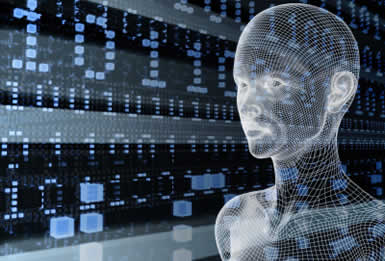
Future Is In Artificial intelligence ?

Looks like These big elephants are creating market for it, Apple’s HomeKit and google’s Brillo making every object you are using at home connected, your every device may start understanding what you are and they serve you what exactly you want and when exactly you want.

You home lock is connected to you phone, your kitchen is fully under your control, your lights will get on as you enter and off as you are leaving the room, algorithms understand your behaviour by analysing the data collected and will suggest you which food you can have now, they alerts you when you are eating high calorie food because your weight is under control since you started Yoga 🙂
artificialIntelligence

Future Of Robotics !

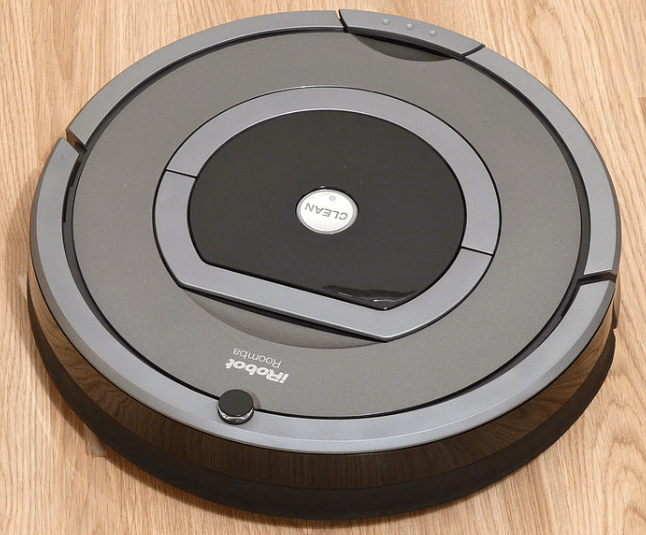
So far robots were made for space missions, for military and for research areas but its the time to have a robot for your personal assistance everything what a human can do, now machines can do much better than him, Robotics in home appliances will be popular soon. Google is investing in robotics not only this much there are Top 10 Robotics companies which are expected to change the future of robotics.
iRobot
iRobot

Automation Industry

Thanks to ipv6, you can generate as many ip addresses using ipv6 where you can automate each and every device of every home in the world, Thanks to the concept of Internet Of Things where every device is connected to cloud directly, google’s Brillo is an example for IoT. You automate everything, control everything just using your smart phone, yeah really smart phone 🙂

Future Of Technology ?

One can imagine now what would be the future of Technology, Everything is connected, Everything under your control, Everything is automated, Everything is smart and intelligent, Everything just in front of your door. Rather than asking what you want, now your devices, your softwares will say what you need 🙂


Imagine the Future !

Companies investing heavily to make your life simpler, but we are really neglecting the mother nature, we are really forgetting environmental issues, our soil is polluted due to waste gadgets, chemicals etc our air is polluted, oceans are polluted. globalisation bringing more and more problems to us. We should really encourage and appreciate the use of renewable energy sources and make our future even better.

Use of solar panel for you mobile to charge, use of solar power to make ur robot work at home, use of intelligent architecture to cool your home/office, what else can be done ? just invent anything keeping environment in mind.

Enjoy the future because you have no work to do, you will be the laziest animal on this planet 🙂


Apple Worldwide Developers Conference (WWDC) 2015 – iOS9 Updates

Apple Worldwide Developers Conference (WWDC) 2015 – iOS9 Updates


Apple concentrated on elevation of foundation of iOS, Extending your battery life, improving performance and enhancing security to protect customer data. The more is added in iOS 9, that is adding an intelligence.

This articles can be an io9 wiki for you, as io9 announcement has been done from apple people were going crazy about it. It looks like A iOS9 Star war kind of things will begin now, yet to see how would be google’s next update. We have seen sci fi movies, but with the intelligence added in iOS now onwards it will come out as iOS 9 sci fi.

iOS9 announcement and updates

1. Intelligence in Siri –

Siri playing a major role in users life, over 1 billion requests per week are recorded.

40% accurate that last year. Siri has really new cool UI.

Intelligence in iOS9 –

Just say “Photos i have taken last august” ,

Siri is great with reminders – Remind me to grab my coffee off the roof when I get into the car.

While browsing just say, “remind me about this when go home “

Intelligence with Apple Siri

Proactivity in iOS 9 – Just plug in your headphone while running in the morning, the audio plays automatically right on your lock screen. A context sensitive to the time, place your iOS 9 is more proactive than before.

iOS 9 Call updates – unknown number ? guessing who this might be ? your iOS 9 scan across all the mail and finds out the number and shows who this is !


Apple iOS9 call update


Apple iOS9 call update


iOS 9 Search updates – swipe to the left size of your home screen, Siri offers you great suggestions, based on your recent activities, you might have meetings, you might have called some one, you might have had chat with some one on important event etc.

Siri Suggestions in iOS9 search


Search in iOS 9 – you can search video which results your iTunes, youtube. you can search scores for your favourite games.

You can call, message get info right in the search page.

iOS 9 search pane
iOS 9 search pane

most important update is Apple providing Search APIs – you can now develop an application for you search to gave more customised search results.

Search APIs and their capabilities – You can have indexed your application content stored within it and provide a deep link into the application screen.

Guess you are preparing breakfast and you wanna see the recipe for a dish, just search Potato

search result shows up your favourite dish prepared using potato which is marked in an application

iOS 9 search and Deep link to app

Tap on it and it takes you directly to that screen of the application

iOS 9 search and Deep link to app


Scrubble bar in Photos – scrubble bar at the bottom helps for quick navigation to all photos, just scroll over it.

scrubble bar in photos ios 9


Apple introduces intelligence throughout the iOS but no compromise with the security,

  • Nothing is associated with your Apple ID
  • Not linked to other Apple Services
  • Not shared with third party
  • You are in control

Everything done on device and under your control

Apple Pay –

2500 brands supporting Apple Pay

Apple working with millions of small businesses to accept Apple pay – Small businesses are most important

More cards added –

Kohl’s Charge or JCPenney Credit Card. R

eward cards, like Dunkin’ Donuts DD Perks, Walgreens Balance Rewards, and MyPanera,

Use yourWallet app and receive and redeem rewards using Apple Pay.

And now you can just double-click the Home button when your iPhone is locked to access Wallet and quickly pay with Apple Pay.

London transportation system working with Apple to support Apple Pay.

Notes App – provides handy tool bard to add headings, text formatting, number bliss, checklists, add a picture using camera

IOS 9 notes app
IOS 9 notes app

Drawing tool in Notes App – Apple providing drawing tool, you can draw and keep it within the application.

Drawign in iOS9 notes app

Note app provides cool new grid view that shows notes based on the photos added, web links stored etc

Note app grid view ios9

Apple Maps : Public transit, it covers all transit lines like buses, subways, trains in a cool way

iOS9 Maps Transit
iOS9 Maps Transit


NEWS application – Apple providing a news application in home screen, which collects news from popular sources.

iOS 9 new app
iOS 9 new app


New look to Keyboard – Suggestion bar and many more

iOS 9 keyboard
iOS 9 keyboard

Keyboard Shortcuts in iOS 9 and Trackpad  :

iOS 9 trackpad
iOS 9 trackpad

Two fingers down over a keyboard the keyboard becomes trackpad instantly. You can use keyboard as trackpad to make selection of text, shortcuts like cut, paste and move the cursor.

If your device is connect to physical keyboard then the shortcuts works great

iOS 9 physical keyboard shortcuts


iOS 9 Multitasking:

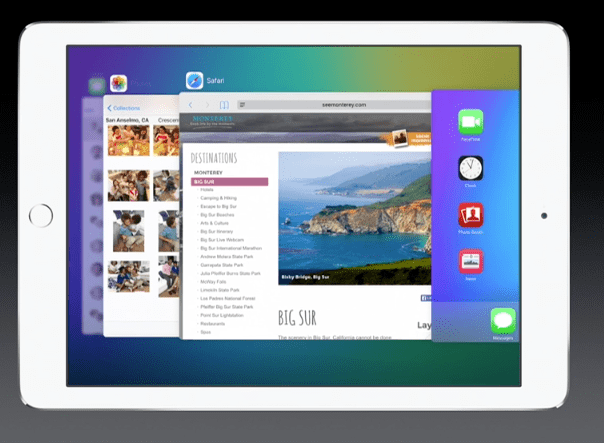
Double tap on home button and see all running apps 

Multitasking iOS 9
Multitasking iOS 9


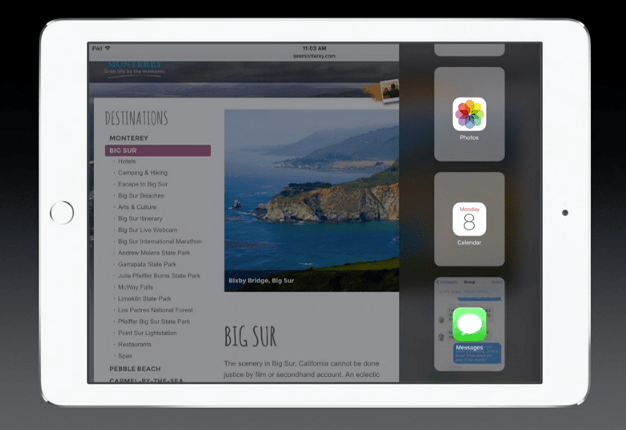
Single finger swipe from the side shows messages in side bar

iOS 9 message in sidebar

Pull down from the top and bring other applications

iOS9 multitasking
iOS9 multitasking

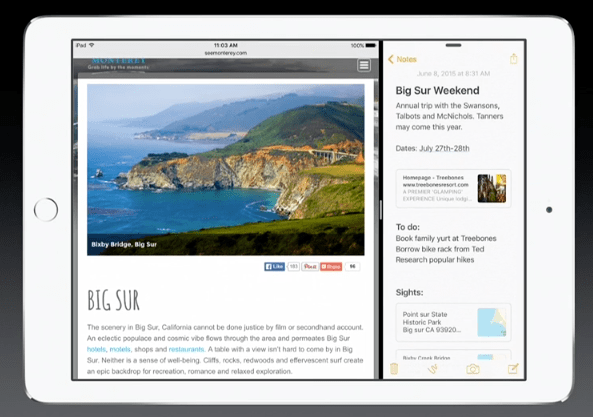
SplitView in iOS 9 

just tap on the divider and both the apps works interactively 

SplitView iOS 9
SplitView iOS 9

For the first time Multi app and multi touch, you can move your fingers on both the apps at the same time and both the apps will responds to your touch gesture.

Multitasking in the context of Video watching 

Video window remains over the screen when you switch to other application as well.

iOS 9 multitasking video context


Performance improvements in iOS 9

iOS 9 takes advantage of Metal graphics library more efficient use of the CPU and GPU to deliver faster scrolling, smoother animation, and better overall performance .

Reference – Read more about metal 

iOS 9 game APIS – Enhanced SpriteKit, SceneKit and Metal and few new kits being added

GamePlayKit, ModelIO and ReplayKit 

Android to iOS migration support Move to iOS app 

Move to iOS app –  Move to iOS app works wirelessly switch from your Android device to your new iOS device.

 It securely transfers your contacts, message history, camera photos and videos, web bookmarks, mail accounts, calendars, wallpaper, and DRM-free songs and books. And it will help you rebuild your app library, too. Any free apps you used — like Facebook and Twitter — are suggested for download from the App Store. And your paid apps are added to your iTunes Wish List.

Move To iOS app
Move To iOS app


Updating iOS will bring life to your iPhone.

Read more about OS X El Capitan

http://knowledge-cess.com/apple-worldwide-developers-conference-wwdc-2015-el-capitan/

Read Smart Cities, Smart Houses : 8-ways-the-internet-of-things-iot-will-change-the-way-you-live

Apple Worldwide Developers Conference (WWDC) 2015 – OS X El Capitan Updates

Apple Worldwide Developers Conference (WWDC) 2015 – OS X El Capitan Updates


Every one of you might be waiting for new updates from Apple, Yeah Apple is awesome, we all love Apple. Just let us go through latest updates from Apple.

Apple Releasing latest OS X updates and it is now called as OS X El Capitan, Why Apple calling its latest OS X update as El Capitan ? The previous OS X version 10.10 is called Yosemite which is the name of a national park, Yosemite National Park, El Capitan is the vertical rock formation in Yosemite.

Let us go through its latest updates.

Mac OS X El Capitan – Features

Shake the cursor it will become bigger which helps you to find the cursor quickly

1. Intelligent Spot light – More expressive, more powerful and more knowledgable.

Search your favourite game you will get game score right there,

If you are going to watch the game on sunday, then just search weather sunday, the weather report for sunday will be just available.

You can resize the spot light search window 🙂 you can move it around the spotlight panel.


Apple Spot light updates


Spotlight search works even more better in others applications too. In Apple Mail you can search “Mail I Ignored from John” or you can search “. It also works great in finder, just search “documents I was working on last june”

Apple mail spotlight search


Apple mail finder search


2. Apple Mail Updates – More gestures added to simplify the tasks. An important mail and want to keep it as unread , just swipe the fingers to left in the side bar. Swipe left to delete the mail.

Apple Mail Gesture - Unread mail
Apple Mail Gesture – Unread mail


Apple Mail Gesture - delete mail
Apple Mail Gesture – delete mail


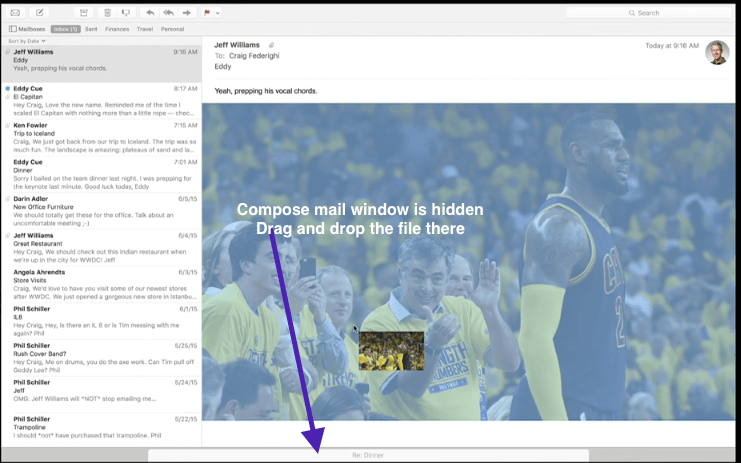
Multi tabbed Compose Mail window – hide your compose window just by clicking somewhere else, then if you want to attach a file then no matter if your compose mail window is hidden, just drag the file at bottom of the mail.

hide compose mail window


Compose window is multi tabbed now.

3. Apple Safari Browser updates – Most important and a very cool update is Pin the site which you visited recently or which you visit daily. Just drag the tap at left most corner and leave it.

Apple Safari updates


Safari Pin Sites updates has lot of special properties – if you close the browser window, Pin sites will remain there itself,they load instantly.

Assume you are opening couple of links from your pin sites, they open up in new tab and more interesting update here is if an audio is playing in a site which you don’t know, you can just pause it from browser search bar. or else you also go to that site just by one tap.

Safari audio mute
Safari audio mute


4. Window management – just three fingers swipe will bring all your windows in organised way to have an overview on all opened windows. More important update here is you can work on two windows side by side. To do this just press and hold maximise icon in the window and then move your window at one side of the screen.

Windows management El Capitan


If Notes application and safari are opened, you can drag and drop the link into notes application, it shows the link with a graphical view

you can just drag and drop an image as shown above .

Another major update is Split view , just drag and drop the window at the top to keep you favourite photo application. to keep messages application along with photo application just drag and drop it into photo application.

Windows dragged and drop it into another application.

El Capitan Split screen

Split screen…

El Capitan Split screen 1


Apple OS X El Capitan Performance Updates –

Upto 1.4X Acceleration in Application Launch

Upto 2X improvement in switching the applicaitons

2X faster first mail messages

4X faster in opening pdf and preview

Apple has made Deep Architectural improvements to the core of OS X El Capitan 

Apple OS X El Capitan – Metal 

Metal is an interface given for high performance graphical tasks, it takes an overhead from the OpenGL and provides high performance APIs and it gives direct access to the underlying hardware.

Apple Replaces OpenGL
Apple Replaces Metal Graphics API

Now all applications, Games using core animation, core graphics will have direct access to native API – Metal

Apple Graphics API Metal


50% rendering performance improvement

40% reduction in CPU overhead that is necessary for graphics, this improves the batter life.

8X performance improvements

Read more about iOS 9 – 

Latest iOS 9 updates
Intelligence in iOS9 , More Proactive iOS 9 , Wonderful updates for iOS 9 Search functionality , APIs for search and many more

http://knowledge-cess.com/apple-worldwide-developers-conference-wwdc-2015-ios9-updates/

Acche Din – Modi Government Achievements

Acche Din – Modi Government Achievements

Why Indian media is so much behind TRP ? TRP can also be achieve by spreading good news. Since Modi government started we can see India is spreading its message to every corner of the world. US visit of Modi and German Visits were key highlights. Every nation getting a clear picture how India is heading ahead and any one can see the bright future ahead. This post is the highlight more about Foreign visits of Narendra Modi, Why Narendra modi travelling to every nation and what was the key aspects behind each visit?

Narendra Modi’s foreign visits…. Narendra Modi is no greenhorn in politics and statecraft. . . He has already achieved more for Gujarat in his tenure as CM there than any Indian state ever had. . . Few hidden (because the main stream media will purposely ignore them) achievements are given below:

Narendra Modi Foreign Visits and Achievements –

1. Modi Visit to Saudi Arabia
BJP Govt. convinced Saudi Arabia not to charge “On-Time Delivery Premium charges” on Crude Oil – Young Petroleum Minister Dharmendra Pradhan & External Affairs Minister Sushma Swaraj sealed the deal. Saved the country thousands of crores…


2. Modi Visit to Bhutan –
India will build 4 Hydroelectric power stations + Dams in Bhutan (India will get lion’s share in Green energy that will be produced in future from these projects) . .


3. Modi Visit to Nepal –
India will build Biggest ever dam of Nepal (China was trying hard to get that) – India will get 83% Green energy produce from that hydro power station for free – in future. . . . .


4. Modi visit to Japan –
Increased relationship with Japan and they agreed to invest $ 30 Billion in DMIC (Delhi – Mumbai Investment Corridor). That’s Rs 200,000 crores by today’s exchange rates….. . .


5. Modi visit to Vietnam –
Increased strategic relationship with Vietnam and Vietnam has now agreed to give contract of Oil exploration to ONGC-Videsh (UPA was not ready to take this at all because they were worried about China – and getting into a conflict of interests on south China sea). The UPA had always been on the backfoot about every aspect of foreign policy. . .


7. Modi Visit to Australia –
India – Australia (NaMo is first PM to visit Australia after 28 yrs), despite Australia being a major supplier of Coal & Uranium. . . NaMo was able to convince Tony Abbott and now Australia will supply Uranium for our energy production. . . .


8. Modi visit to Sri Lanka –
China leaning President Rajapakse lost elections in Sri Lanka – Remember UPA lost “Hambantota” port development – read latest report of CIA, where they mention RAW has played a major role in power shift of Sri Lanka. And Sri Lanka has backed out of Chinese contract and shifted to Indian project managers. . .


9.Modi Visit to China
With China, as Trade Deficit was increasing, NaMo forced their hand. Anti-Dumping will come soon so China will invest heavily into India. – China has already committed $ 20 billion Investment in India. That’s nearly ₹140,000 crores. . . .


Modi government and achievements highlights

1. On Security – I think adding Ajit Doval to his team is the best decision by NaMo. See the recent tie-up with Pentagon, Israel & Japan. . . Remember I. K. Gujaral as PM stopped RAW’s offensive operations in foreign countries. . Now see how we stopped the Terror Boat and listen to his words … “Any Mumbai like attack from Pakistan and Pakistan will lose Baluchistan!” That’s the language of deterrence that I want to hear as an Indian. We won’t hit first, but if you do, we surely won’t turn the other cheek…. . . .


2. India approved the border road in the NorthEast and around India- China border – Remember just because of China’s opposition, the ADB (Asian Development Bank) didn’t give us funds during UPA regime and UPA held that file under “Environment Ministry control – Remember the infamous “JAYANTHI TAX “? No one bothered about the disastrous effect on our armed forces. . . .


3. India managed to bring back 4,500+ Indians from War zone in Yemen and also brought foreign nationals of 41 different countries, which put India’s name onto the highest platform globally in conducting that rescue mission – PM Narendra Modi specially talked to the new Saudi Arabian king Salman and told him to allow Indian Airforce planes to fly – as Saudi Arabia was attacking on Yemen and Yemen skies was declared NO-FLY Zone: thanks to this we got an assured clear window of a few hours and guys guess who coordinated this? Ajit Doval, Sushama Swaraj and Gen V K Singh. All in person…. When was the last time you ever heard of ministers involved personally in such efforts that didn’t fetch thousands of crores?? Guess the religion of those rescued?? But it isn’t secular to mention that most of those rescued from Yemen or earlier from Iraq weren’t Hindus at all.. . .


4. India’s Air defense was getting weaker by the day, UPA was very happy to let it happen despite repeated specific inputs from the armed forces, NaMo renegotiated Rafale fighter Jets deal with France personally and bought 36 Jets on ASAP basis. At better than rack rates. No middlemen, no commissions… . . .


 5. For the first time after 42 yrs Indian Prime Minister visited Canada not to attend some meeting but as a specific state visit, in a Bilateral deal, India was able convince to Canada to supply Uranium for India’s Nuclear reactors for next 5 years. It will be of great help to resolve India’s Power problems. . . .


6. Canada approves visa on arrival for all Indian tourists. . . .


7. Till recently we were exclusively buying Nuclear Reactors from Russia or USA and it was much like beggar kind of situation because they were worried about usage of Nuclear reactor for some other use. So only what they opted to give us, we could get. . Now Narendra Modi was able to convince France and now France will make Nuclear reactors with the latest technology in India. On MAKE IN INDIA efforts.. with collaboration with an Indian company as a partner. . .


8. During 26th Jan. visit of Barak Obama, NaMo convinced USA to drop rule of Nuclear fuel tracking and sorted out Liabilities rules which now open the gates for next 16 Nuclear power plant projects. . . . Isn’t this good enough to improve the lot of India??


Many more …

Smart Agriculture – Smart Floating Farming

Smart Agriculture – Smart Floating Farming ( Future Of Farming )


Smart Floating Farm
Smart Floating Farm

Now all goes smart and yeah even agriculture also. What is the need of smart farming ?

According to the United Nations‘ World Population Prospects report, the world population is currently growing by approximately 74 million people per year. Current United Nations predictions estimate that (based on current growth trends) the world population will reach 9 billion in 2040.   11.0 billion around 2050.

Reference – World population predictions – Wikipedia 

Now should I explain why we need smart farming ? 

FORWARD THINKING ARCHITECTURE

Smart floating farm
Smart floating farm


It really looks smart 🙂

smart floating farm 2


Architecture of Smart Floating Farms

Architecture of Smart Floating Farms


Javier F. Ponce is an architect and founder of Forward Thinking Architecture from Barcelona, Spain, a company dedicated to environmentally beneficial and societally progressive architecture and urban design. They started working on Smart Floating Farming.

Floating farm runs on solar power and produces 8,152 tonnes of vegetables and 1,703 tonnes of fish a year, they also be used to catch 1.7 million fish a year.

The farms roof will be integrated with high performing photovoltaic panels and produces aprox : 2.72 MW. They will be 24m height and designed with a tree like structure

“Based on a Floating Multi-layered strategy which combines Aquaculture (fish), Hydroponics (crops) and Photovoltaics (solar power), we aim that these floating farms can be located close to areas where food is more needed and potentially become automated Farm Clusters run by the use of IT technologies/software.” Says Ponce on Forward Thinking Architecture’s.

Javier F. Ponce graduated from Tecnologico de Monterrey, attended UPC University in Barcelona and holds a Masters degree in Construction Technologies. Javier was an intern at Shigeru Ban Architects in Tokyo and afterwards he worked for 2 years at Norman Foster and Partners in London between 2007 and 2009, where he was exposed to different scales and types of projects worldwide.Javier has also collaborated as a freelance architect with Foreign Office Architects FOA and Alejandro Zaera’s architecture office.

Reference – Forward Thinking Architecture’s.

Now question is ” Are floating farms the answer to solving world hunger? “

MIT’s Robot can jump over hurdles : Cheetah robot

MIT’s Robot can jump over hurdles : Cheetah robot

Human’s can achieve anything, human mind is the greatest gift of god. If you run in hurry or if you run on a moving floor your mind will get confused and some times you fell down. If you are not practiced then you can’t even cross two three hurdles continuously, you will fell down. Have you ever wondered a robot can do this ? it is so difficult to program even a simplest automation or even a simplest robot which can just move by itself. Now we have everything ready made so you may say it is not so difficult, but Cheetha which can run and jump over the hurdles ? really challenging.

A MIT’s Cheetah Robotic TEAM

Deborah Ajilo, Negin Abdolrahim Poorheravi,John Patrick Mayo,Justin Cheung, Sangbae Kim, Shinsuk Park, Kathryn L. Evans, and Matt Angle.  Will Bosworth, Joao Luiz Almeida Souza Ramos, Sehyuk Yim, Albert Wang, Meng Yee Chuah, and Hae Won Park.

Algorithm Behind MIT’s Cheetha robot :

The bounding algorithm which made this possible will program each of the robot’s legs to exert a certain amount of force in the split second during which it hits the ground, in order to maintain a given speed: In general, the faster the desired speed, the more force must be applied to propel the robot forward.

the cheetaha robot adopts the force as per the surface and hence it successfully passed the test in grassy area and treadmill.Robot can run 16 km/h, jump about 40 centimetres high, land safely and continue running for at least 15 minutes .

Technical Details of MIT’s Bounding Algorithm and Robotic Cheetah

It took more than 5 years to achieve this and Cheetah 2 contains the custom electric motor designed by Jeffrey Lang, the Vitesse Professor of Electrical Engineering at MIT and the amplifier designed by David Otten, a principal research engineer in MIT’s Research Laboratory of Electronics. 

“bounding algorithm” calculates the varying amounts of force required to propel an animal forward or to jump over obstacles. Algorithm models the running mechanics of world-class sprinters like Olympian Usain Bolt: the faster the desired speed, the greater the force the legs exert.

This robotic cheetah carries out its movements with the help of battery powered electric motors which do not make much noise even.  Though the US-military has been trying for several years to make a stealthy and fast robot, it hadn’t been successful until now so this DARPA funded research by the MIT researchers may just open a whole new vision regarding the making of a stealthier bot.


What is Yoga – Yoga

What Is Yoga – A Definition by Patanjali 

Patanjali describes Yoga as ‘ Chitta vrtti nirodhah’, it is translated as suppression (nirodhah) of the fluctuations(vrtti) of consciousness (chitta). Chitta denotes that the mind in its total or collective sense and it is composed of three important categories.

a) Mind – Manas, that is the power and faculty of attention, selection and rejection.

b) Intelligence or Reason –  Buddhi, that is the decisive state which determines the distinction between things

c) Ego – (ahamkara, literally the I maker ).

The driving force for a human life is ‘ I ‘ factor, I know , I made. Without the self there is no life, but the I factor should not grow within you we should try to suppress it as much as possible to make the life beautiful.


Yoga is the method by which the restless mind is calmed and the energy directed into constructive channels. Shri Krishna in Bhagavad Gita sixth chapter, describes yoga to Arjuna as – The meaning of Yoga as a deliverance from contact within pain and sorrow. ‘ When the mind, intellect and self (ahamkara) are under control, freed from restless desire, so that they rest within yourself, a man become Yukta – one in communion with God.

The Stages of Yoga

Patanjali enumerates eight limbs of Yoga.

1. Yama – Universal Moral Commandments

2. Niyama – Purification of self through discipline 

3. Asana – Posture

4. Pranayama – Rhythmic control of the breath

5. Pratyahara – Withdrawal from the domination of the senses and exterior objects

6. Dharana – Concentration

7. Dyaana – Meditation

8. Samadhi – A state of super consciousness brought about by profound meditation.

Yama and Niyama control the yogi’s passion and emotions. Asanas keep the body healthy and strong. Finally the yogi becomes free of body consciousness.

Pranayama and Pratyahar, teach the aspirant to regulate the breathing and their by control the mind. This helps to free the senses from the objects of desire.

Dharana, Dhyana and Samadhi take the yogi a state of super consciousness brought about by profound meditation.

Also Read http://knowledge-cess.com/ancient-indian-education-system/

Interesting Facts to know about Ancient India

Some Interesting Facts to know about Ancient India

The whole world knew that India is the mother of many inventions. We all knew many facts which are very common like Aryabhata calculated that 1,582,237,500 rotations of the Earth equal 57,753,336 lunar orbits. This is an extremely accurate ratio of a fundamental astronomical ratio (1,582,237,500/57,753,336 = 27.3964693572), and is perhaps the oldest astronomical constant calculated to such accuracy.

We come across many such facts but there are few facts which many of us don’t know. So I would like to highlight two such facts.

History of Discovery of Airoplane in Ancient India –

Many of us doesn’t know that Indians invented the airoplane, A person called Shivkar Bapuji Talpade an Indian, made plane in 1895 Near Mumbai. Unbelievably without pilot the plane was working with remote control and flying at 1500 feet successfully.

Great vimaan shaastranjya of India was Maharshi Bharadwaj. Maharshi vrushi  Written a book Vaimaanika shaastra on Vimaan shaastra. Plane were capable to fly based on a free energy technic called anti – gravity Shivkar Bapuji Talpade referred those books. The book explains 500 siddhant (tareeke, techniques) to make a plane.

Read more about it – http://www.washingtonpost.com/blogs/worldviews/wp/2015/01/04/indians-invented-planes-7000-years-ago-and-other-startling-claims-at-the-science-congress/

Discovery of Atomic Bomb : Based on Ancient Indian Text

It is documented that Americans didn’t made their nuclear weapon on their own, they have no such technology and knowledge of making nuclear weapon. It is documented that USA did first ever nuclear weapon with the help of German scientists who translated one of the Ancient Indian Text.

Reference –

Albert Einstein said: We owe a lot to the Indians (Hindus), Who taught us how to count, without which no worthwhile scientific discovery could have been made.

Ancient Indians introduced Devanagari Language, which is the first ever language documented in the history. Later we introduced Sanskrit, Sanskrit is the mother of all the European languages.

The World’s first university was established in Takshila in700BC. More than 10,500 students from all over the world studied more than 60 subjects. Ancient Indians adopted monitorial education system. The University of Nalanda built in the 4th century BC was one of the greatest achievements of ancient India in the field of education. 

Sanskrit Language: The Most Scientific, Ancient, Spiritual 

Also read – http://knowledge-cess.com/what-is-yoga-yoga/

Also read – http://knowledge-cess.com/ancient-indian-education-system/

Android: ItemClickListner with CheckBox or RadioButton.

Android: ItemClickListner with CheckBox or RadioButton.

Lets take a scenario to understand the need of a listview which will have checkbox embedded in it.

Consider the flipkart mobile app, in that we want to compare 2 or more products, in order to do that I will go on selecting the items which I want to compare and then click on the compare button.


So we have multiple items in that and hence we cant use the android built in types for creating the list view. Hence we need to follow the below mentioned approach.


  1. Create an activity, which contains 2 listviews, one listview for displaying all available mobiles and another listview for displaying selected mobiles.
  2. Create an adapter for filling the mobile list for the above mentioned listviews.
  3. The layout which will be used for creating row which will make ItemClickListner work is as follows,


Observe the following attributes for Checkbox,

        android:focusable="false"
        android:focusableInTouchMode="false"
        android:clickable="false"

These make the checkbox non clickable and eventually the event will be transferred to its parent i.e the row and hence the ItemClickListner will be invoked.

You can download the files here

Circle drawing and filling arc in android

Circle drawing and filling arc in android

It is always a fun to play with mathematics, everything in this world is happening because mathematics. Mathematics is everywhere, every moment. Computers, physics, chemistry, biology every area is just standing upon Math.

Being an enthusiastic developer I always love to play with mathematics, so here is an example which draws a circle and a filling arc within the circle. Definitely you will get a the code in many web sites if you just google. But i would like to explain the math that plays an important role to achieve this.

[AdSense-A]

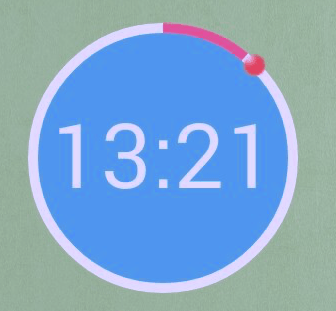
The result should look as follow.

CircleFillingAndroid

Let me divide the code in three sections.

Section 1 : Drawing a circle

How to draw a circle in android using Canvas and Paint ?

[AdSense-B]

Code :


        int screenWidth = 420;  //Give your device screen width here 
        int horizontalCentreX = screenWidth/2;
        int circleCentrex = horizontalCentreX;
        int circleCentreY = 150;
        int radius = 130;
        int arcStartingAngle = 270;
        int minutes = 15;
        int seconds = 60;
        int minsToSecondsConverionFactor= minutes * seconds; //just to fill the circle for 15 mins
        int arcRectStartingX = circleCentrex - radius;
        int arcRectStartingY = 20;
        int arcRectEndingX = circleCentrex + radius;
        int arcRectEndingY = 280;

       //Just create a bit map of size (width = screen width, height = depends on how big circle you want
         Bitmap b = Bitmap.createBitmap(screenWidth, 300, Bitmap.Config.ARGB_8888);

        Paint paint = new Paint();
        Canvas canvas = new Canvas(b);
        paint.setColor(Color.rgb(62, 176, 220));
        paint.setStrokeWidth(10);
        paint.setStyle(Paint.Style.FILL);
        paint.setAntiAlias(true);
  
        canvas.drawCircle(circleCentrex, circleCentreY, radius, paint);

Section 2 : Drawing an Arc

So How to draw a filling arc in android using Canvas and Paint ?

Code :

   paint.setColor(Color.rgb(250, 64, 129));
        paint.setStrokeWidth(10);
        paint.setStyle(Paint.Style.FILL);
        final RectF oval = new RectF();
        paint.setStyle(Paint.Style.STROKE);
        oval.set(arcRectStartingX, arcRectStartingY, arcRectEndingX, arcRectEndingY);
        canvas.drawArc(oval, arcStartingAngle, ((i * 360) / minsToSecondsConverionFactor), false, paint);

Section 3 : Drawing a Point at the end of the filling arc

Here is the trick, to calculate the end point in the filling arc, we need to apply Trigonometry. Let me explain this in steps.

Observe the figure given below,

circle
circle

The figure shows Circle drawn at the centre point(CenterX,CenterY) . We have have an arc which will be continuously drawn and the arc fills the circle in the direction as shown in the figure. So our job is to find out the point(x,y) and the end of the arc.

If you observe a triangle drawn with Centre of the circle and point over the arc, it will be a right angled triangle.

So by applying trigonometry

  cos(θ) = adjacent / hypotenuse
         = adjacent / radius ( because radius == hypotenuse)
         
  adjacent = cos(θ) * radius
       x   = cos(θ) * radius ( this is because point (x,y) is nothing but point is X distance (along X-Axis) aways from Centre and Y distance away (along Y-Axis).

 sin(θ) = opposite / hypotenuse
        = opposite / radius
      y = sin(θ) * radius ( this is because point (x,y) is nothing but point is X distance (along X-Axis) aways from Centre and Y distance away (along Y-Axis).

But the values we got x and y are from the centre but the centre is centreX distance aways from the left side of the screen and centreY distance away from the top side of the screen.

Hence point x on the arc must be = centreX + x distance aways from Left side of the screen
                                 = centreX + cos(θ) * radius

Hence point y on the arc must be = centreY + y distance aways from Left side of the screen
                                 = centreY + sin(θ) * radius


If you debug and observe the y value we get will increase initially and start decreasing, this depends upon the angle, angle less than or equal to 90deg will be give +ve value for cos(θ) and angle greater than 90deg will give -ve value.

Hence the above calculation always gives you end point of the filling arc along the circumference of the circle.