Amazon Cloud EC2 : Create and configure free tier account
Are you searching for Free tier amazon AWS EC2 guide or tutorial ? Those who are working on Setup, configure and maintaining AWS amazon Server EC2 and S3 bucket. Here is the perfect guide for you. Sys Admins will love the guide.
Steps to create Amazon EC2 cloud account,
[AdSense-A]
1. GO to EC2 console and click on Instances at the left panel and Click on Launch Instance
Create Amazon EC2 account
2. Select the AmazonMachine Image (AMI) which you want. (I have selected the 1st one ie amazon linux AMI)
Chose Amazon Machine (AMI)
[AdSense-B]
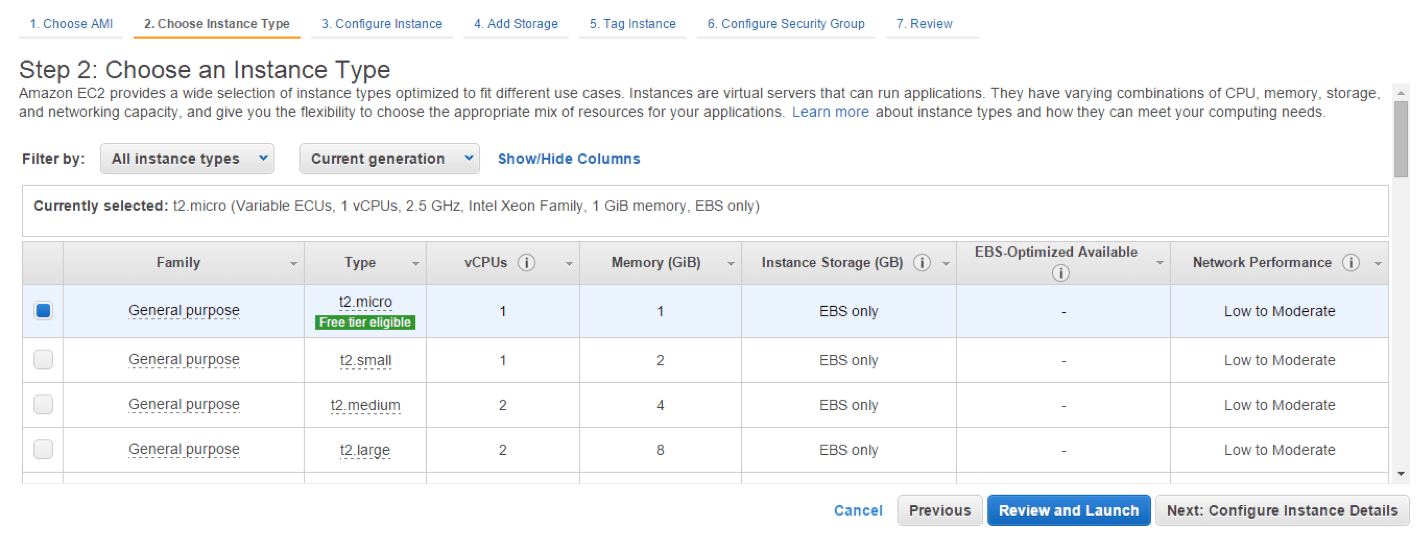
3. By default General purpose is selected ie free-tier (t2.micro type). (You can select the any instance type you want based on your requirement) (I have selected the free tier t2.micra which comes with 1 GB ram by default)
Amazon EC2 Instance type
4. Click Next tab at the below to configure the corresponding details. And in configure Security Group step select the Select an existing security group radio button and then Click on Review and Launch
5. Click on Review andLaunch.
6. Once you click on Launch it will ask you to create key pair. Select Create New Key Pair from the drop down and give some name and click on Download key pair (It will helpful in future to connect Amazon server using putty). It will download one .pem file with the given name
7. Click on Launch Instances, this completed the creation of Amazon instances. In the next screen click on the view instances
Amazon EC2 launch instance
Amazon EC 2 DB instance creation
1. Click on Services at the top bar select RDS at the left panel, Select DataBase under all services and then select RDS
Amazon EC2 DB creation
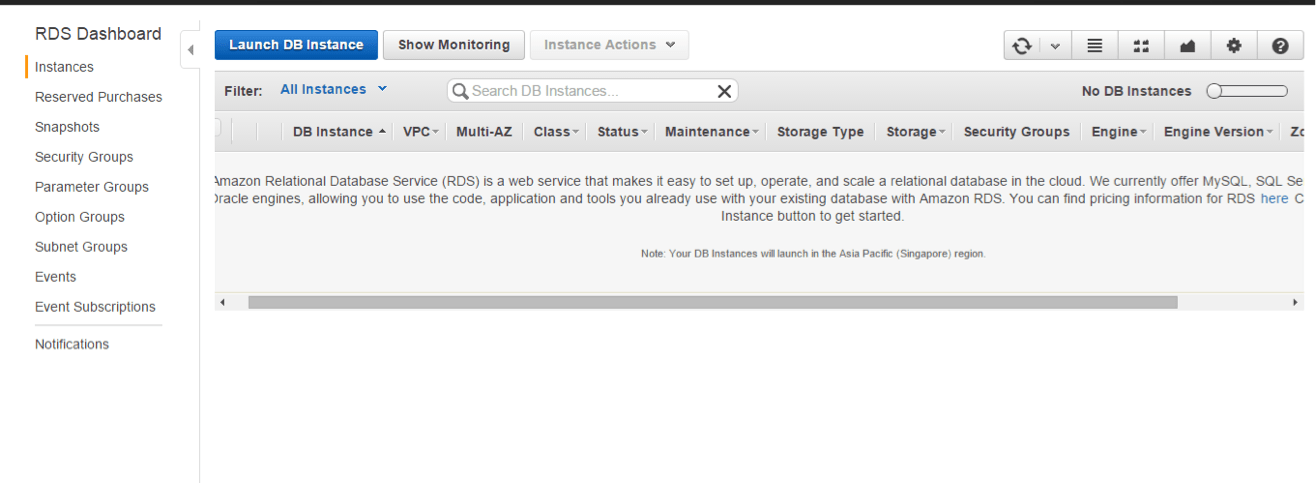
2. Click on instances at the left panel and click on Launch DB Instance.
Amazon EC2 DB instance create
3. Select the required DB engine. (I am selecting MySql)
4. Production Select the No radio button for the free tier version and click on next step.
Amazon EC2 DB instance free tier
5. Fill the DB details in with the below details.
License Model : General-public-license
DB Engine Version : 5.6.2.3
DBInstance Class : db.t2.micra -1vCPU, 1 GB RAM
Multi-AZ Deployment : No
Storage Type : General Purpose (SSD)
Allocated Storage : 5
Provide the DB instance identifier, Master username and Passwor (these details will be usefull later for DB connection from the application or to connect from the sql clients)
Click on Next Step : Configure the advance details as shown below image for free tier.
Amazon EC2 DB Instance Advanced Settings
Amazon EC2 DB instance Advanced Settings
Amazon EC2 DB instance Advanced Settings 1
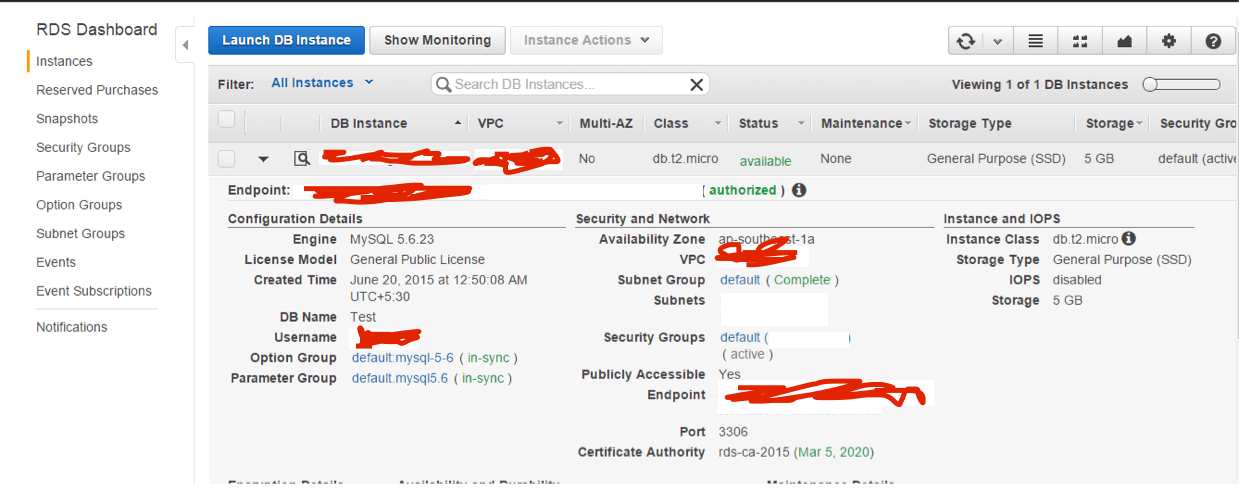
5. Click on the Launch DB Instances and click on view DB instance to see the DB details. (It may take some time to create the DB)
Solar powered Smartphones : Solar thin plate at back of the smartphone
What will be the impact on environment due to usage of smart phones ? how much energy they consume ? this might look silly because after all a smartphone how much it can consume ?
fine let us analyse the data …
[AdSense-A]
How much electricity your Gadgets use ?
An iPhone 6 plus battery spec is 2915 mAh battery (11.1 Wh), for your information 1Wh is a unit of energy equivalent to one watt (1 W) of power expended for one hour (1 h) of time.1 Wh represents 3600 joules of energy. Your iPhone uses 11.1Wh, now assuming you will charge your phone every day, so it means every year your phone consumes 4000Wh of energy per year.
now think about number of iPhone users , yeah here is the stats. Apple sold a whopping 74.4 million iPhones over the 90 day period. Which means 74400000 iPhones ( assuming all are iPhone 6 plus ). So the total amount of energy will be 1,97,60,00,00,000Wh.
A CFL bulb uses 767KWh per year, now converting 1,97,60,00,00,000Wh. to KWh gives us 29,76,00,000Wh
so using this much power we can use 389CFL bulbs for a year. Wait I am just considering iPhone 6 here.
We have Micromax,Samasung Galaxy series, HTC, Motorola etc.
[AdSense-B]Now let us take a look into total number of mobile phones used in the world 🙂
Total number of mobiles in the world
Its a huge number – so energy being used ???
Why it is necessary to think about Solar Powered Smart phones ?
Considering the above stats it is really a good idea to think about keeping a solar plate attached to the back of your smart phone and completely avoid using electricity for charging. If you start using 3G you have charge your phone atleast two times in a day, playing videos and games at least three-four times you have to charge in a day.
Let us look into few more stats – The below data is almost 3-4 years old
61% of smart phone subscriptions, 4221 Mega joules of energy which is equivalent to 32gallons of Gas and emits 112Kgs of CO2.
Transferring 1GBit of data over 3G network will use 933 Mega joules of energy, If every one left their cell phone charger plugged It would waste electricity enough to power 28000 homes.
Where we are heading ? What will be the future ? The whole world is evolving just due to few big elephants, yeah Google,Apple,Facebook and Microsoft. Thousands of companies every day emerging out and directly or indirectly these big elephants are source for all these evolution in technology, they are changing the world.
We have seen great inventions happened in last decade, Everything which was there upon the table now came to your finger tips, you can speak to your mobile and yeah it responds you back nicely. Apple Siri changed the way of communication with its touch interface in iPhone and voice interface in Siri, google now and microsoft’s Cortana.
Microsoft took one step ahead with its Hologram that is one of the awesome idea, but how much that would be complete we have to see only when we get it in use. Google’s self driving car and now Apple in the same line.
What else ??
An Era of Adopting to Technology
This is very old story now, 5 years before people use to say we should adopt technology, use technology and grow your business, use technology and optimise your tasks, use technology schedule your duty oh what not? It became big problem for old generation who never understood how to use computers and how to learn to use applications etc.
Observing closely the recent evolution in technology proves that, that era has gone now, it is taking a new shape and evolving even more sophisticatedly and smartly. then What we could expect out it ?
An Era of Technology being adopted to humans
Does’t it looks funny ? or does it make any sense ? yes of course it makes sense. Softwares are becoming smart with the intelligent algorithms, devices are becoming smarter with ultimate sensors, It is not just your touch, it is not just your voice now your movements and pattern are being analysed by algorithms and your device decides what to do next ! Google Search becoming clever every day it can understand the context you are working and you can query as if you are speaking to some one. Apple announced latest OS, the main focus is to make their device intelligent, It understands where you are, it understands what you are looking for it suggests you.
Operating systems are becoming smarter day by day, the data you are going to access are local more native centric, machines knew what you want, they understand you better than any one else 🙂
Future Is In Artificial intelligence ?
Looks like These big elephants are creating market for it, Apple’s HomeKit and google’s Brillo making every object you are using at home connected, your every device may start understanding what you are and they serve you what exactly you want and when exactly you want.
You home lock is connected to you phone, your kitchen is fully under your control, your lights will get on as you enter and off as you are leaving the room, algorithms understand your behaviour by analysing the data collected and will suggest you which food you can have now, they alerts you when you are eating high calorie food because your weight is under control since you started Yoga 🙂
artificialIntelligence
Future Of Robotics !
So far robots were made for space missions, for military and for research areas but its the time to have a robot for your personal assistance everything what a human can do, now machines can do much better than him,Robotics in home appliances will be popular soon. Google is investing in robotics not only this much there are Top 10 Robotics companies which are expected to change the future of robotics.
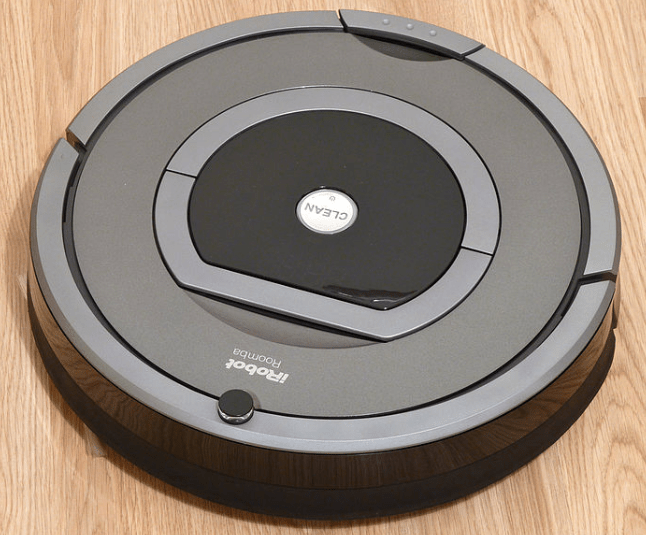
iRobot
Automation Industry
Thanks to ipv6, you can generate as many ip addresses using ipv6 where you can automate each and every device of every home in the world, Thanks to the concept of Internet Of Things where every device is connected to cloud directly, google’s Brillo is an example for IoT. You automate everything, control everything just using your smart phone, yeah really smart phone 🙂
Future Of Technology ?
One can imagine now what would be the future of Technology, Everything is connected, Everything under your control, Everything is automated, Everything is smart and intelligent, Everything just in front of your door. Rather than asking what you want, now your devices, your softwares will say what you need 🙂
Imagine the Future !
Companies investing heavily to make your life simpler, but we are really neglecting the mother nature, we are really forgetting environmental issues, our soil is polluted due to waste gadgets, chemicals etc our air is polluted, oceans are polluted. globalisation bringing more and more problems to us. We should really encourage and appreciate the use of renewable energy sources and make our future even better.
Use of solar panel for you mobile to charge, use of solar power to make ur robot work at home, use of intelligent architecture to cool your home/office, what else can be done ? just invent anything keeping environment in mind.
Enjoy the future because you have no work to do, you will be the laziest animal on this planet 🙂
Apple Worldwide Developers Conference (WWDC) 2015 – iOS9 Updates
Apple concentrated on elevation of foundation of iOS, Extending your battery life, improving performance and enhancing security to protect customer data. The more is added in iOS 9, that is adding an intelligence.
This articles can be an io9 wiki for you, as io9 announcement has been done from apple people were going crazy about it. It looks like A iOS9 Star war kind of things will begin now, yet to see how would be google’s next update. We have seen sci fi movies, but with the intelligence added in iOS now onwards it will come out as iOS 9 sci fi.
iOS9 announcement and updates
1. Intelligence in Siri –
Siri playing a major role in users life, over 1 billion requests per week are recorded.
40% accurate that last year. Siri has really new cool UI.
Intelligence in iOS9 –
Just say “Photos i have taken last august” ,
Siri is great with reminders – Remind me to grab my coffee off the roof when I get into the car.
While browsing just say, “remind me about this when go home “
Intelligence with Apple Siri
Proactivity in iOS 9 – Just plug in your headphone while running in the morning, the audio plays automatically right on your lock screen. A context sensitive to the time, place your iOS 9 is more proactive than before.
iOS 9 Call updates – unknown number ? guessing who this might be ? your iOS 9 scan across all the mail and finds out the number and shows who this is !
Apple iOS9 call update
Apple iOS9 call update
iOS 9 Search updates – swipe to the left size of your home screen, Siri offers you great suggestions, based on your recent activities, you might have meetings, you might have called some one, you might have had chat with some one on important event etc.
Siri Suggestions in iOS9 search
Search in iOS 9 – you can search video which results your iTunes, youtube. you can search scores for your favourite games.
You can call, message get info right in the search page.
iOS 9 search pane
most important update is Apple providing Search APIs – you can now develop an application for you search to gave more customised search results.
Search APIs and their capabilities – You can have indexed your application content stored within it and provide a deep link into the application screen.
Guess you are preparing breakfast and you wanna see the recipe for a dish, just search Potato
search result shows up your favourite dish prepared using potato which is marked in an application
iOS 9 search and Deep link to app
Tap on it and it takes you directly to that screen of the application
iOS 9 search and Deep link to app
Scrubble bar in Photos – scrubble bar at the bottom helps for quick navigation to all photos, just scroll over it.
scrubble bar in photos ios 9
Apple introduces intelligence throughout the iOS but no compromise with the security,
Nothing is associated with your Apple ID
Not linked to other Apple Services
Not shared with third party
You are in control
Everything done on device and under your control
Apple Pay –
2500 brands supporting Apple Pay
Apple working with millions of small businesses to accept Apple pay – Small businesses are most important
More cards added –
Kohl’s Charge or JCPenney Credit Card. R
eward cards, like Dunkin’ Donuts DD Perks, Walgreens Balance Rewards, and MyPanera,
Use yourWallet app and receive and redeem rewards using Apple Pay.
And now you can just double-click the Home button when your iPhone is locked to access Wallet and quickly pay with Apple Pay.
London transportation system working with Apple to support Apple Pay.
Notes App – provides handy tool bard to add headings, text formatting, number bliss, checklists, add a picture using camera
IOS 9 notes app
Drawing tool in Notes App – Apple providing drawing tool, you can draw and keep it within the application.
Drawign in iOS9 notes app
Note app provides cool new grid view that shows notes based on the photos added, web links stored etc
Note app grid view ios9
Apple Maps : Public transit, it covers all transit lines like buses, subways, trains in a cool way
iOS9 Maps Transit
NEWS application – Apple providing a news application in home screen, which collects news from popular sources.
iOS 9 new app
New look to Keyboard – Suggestion bar and many more
iOS 9 keyboard
Keyboard Shortcuts in iOS 9 and Trackpad :
iOS 9 trackpad
Two fingers down over a keyboard the keyboard becomes trackpad instantly. You can use keyboard as trackpad to make selection of text, shortcuts like cut, paste and move the cursor.
If your device is connect to physical keyboard then the shortcuts works great
iOS 9 physical keyboard shortcuts
iOS 9 Multitasking:
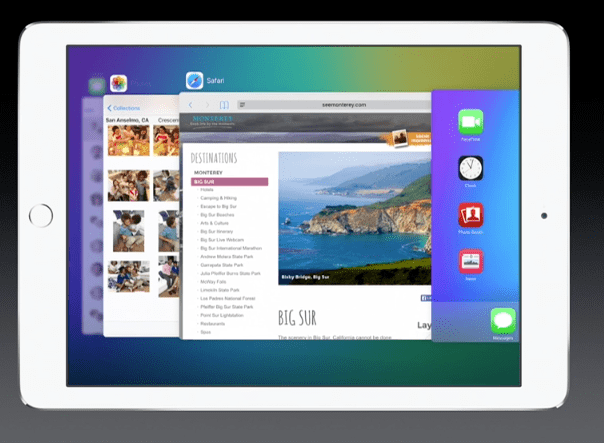
Double tap on home button and see all running apps
Multitasking iOS 9
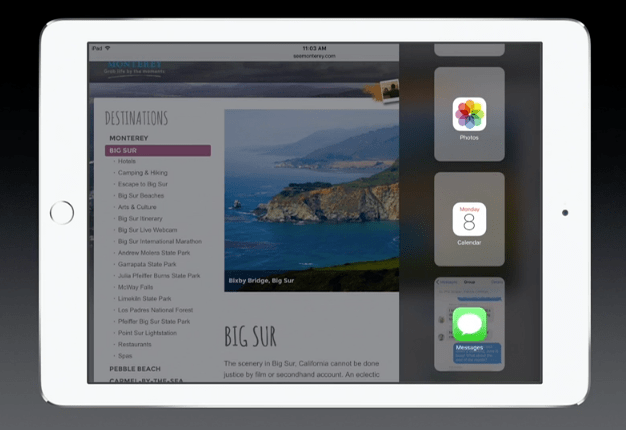
Single finger swipe from the side shows messages in side bar
iOS 9 message in sidebar
Pull down from the top and bring other applications
iOS9 multitasking
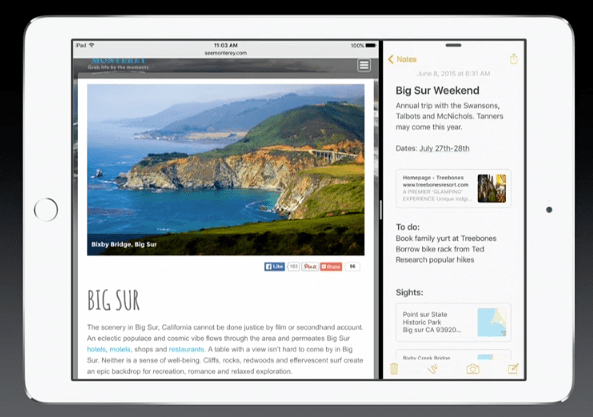
SplitView in iOS 9
just tap on the divider and both the apps works interactively
SplitView iOS 9
For the first time Multi app and multi touch, you can move your fingers on both the apps at the same time and both the apps will responds to your touch gesture.
Multitasking in the context of Video watching
Video window remains over the screen when you switch to other application as well.
iOS 9 multitasking video context
Performance improvements in iOS 9
iOS 9 takes advantage of Metal graphics library more efficient use of the CPU and GPU to deliver faster scrolling, smoother animation, and better overall performance .
iOS 9 game APIS –Enhanced SpriteKit, SceneKit and Metal and few new kits being added
GamePlayKit, ModelIO and ReplayKit
Android to iOS migration support Move to iOS app
Move to iOS app – Move to iOS app works wirelessly switch from your Android device to your new iOS device.
It securely transfers your contacts, message history, camera photos and videos, web bookmarks, mail accounts, calendars, wallpaper, and DRM-free songs and books. And it will help you rebuild your app library, too. Any free apps you used — like Facebook and Twitter — are suggested for download from the App Store. And your paid apps are added to your iTunes Wish List.
Apple Worldwide Developers Conference (WWDC) 2015 – OS X El Capitan Updates
Every one of you might be waiting for new updates from Apple, Yeah Apple is awesome, we all love Apple. Just let us go through latest updates from Apple.
Apple Releasing latest OS X updates and it is now called as OS X El Capitan, Why Apple calling its latest OS X update as El Capitan ? The previous OS X version 10.10 is called Yosemite which is the name of a national park, Yosemite National Park, El Capitan is the vertical rock formation in Yosemite.
Let us go through its latest updates.
Mac OS X El Capitan – Features
Shake the cursor it will become bigger which helps you to find the cursor quickly
1. Intelligent Spot light – More expressive, more powerful and more knowledgable.
Search your favourite game you will get game score right there,
If you are going to watch the game on sunday, then just search weather sunday, the weather report for sunday will be just available.
You can resize the spot light search window 🙂 you can move it around the spotlight panel.
Apple Spot light updates
Spotlight search works even more better in others applications too. In Apple Mail you can search “Mail I Ignored from John” or you can search “. It also works great in finder, just search “documents I was working on last june”
Apple mail spotlight search
Apple mail finder search
2. Apple Mail Updates – More gestures added to simplify the tasks. An important mail and want to keep it as unread , just swipe the fingers to left in the side bar. Swipe left to delete the mail.
Apple Mail Gesture – Unread mail
Apple Mail Gesture – delete mail
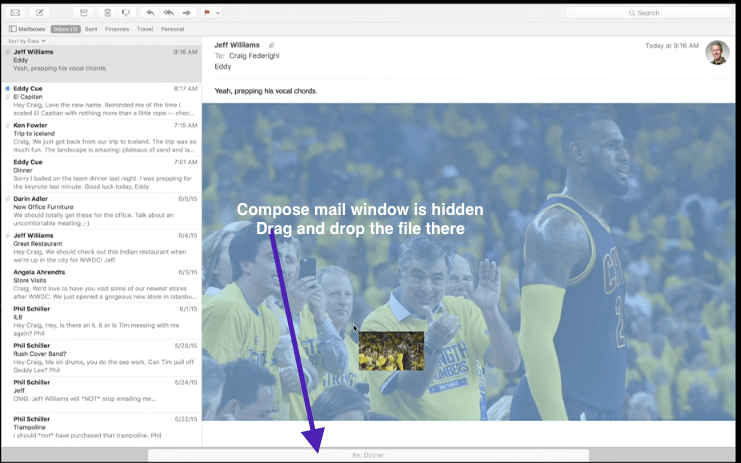
Multi tabbed Compose Mail window – hide your compose window just by clicking somewhere else, then if you want to attach a file then no matter if your compose mail window is hidden, just drag the file at bottom of the mail.
hide compose mail window
Compose window is multi tabbed now.
3. Apple Safari Browser updates – Most important and a very cool update is Pin the site which you visited recently or which you visit daily. Just drag the tap at left most corner and leave it.
Apple Safari updates
Safari Pin Sites updates has lot of special properties – if you close the browser window, Pin sites will remain there itself,they load instantly.
Assume you are opening couple of links from your pin sites, they open up in new tab and more interesting update here is if an audio is playing in a site which you don’t know, you can just pause it from browser search bar. or else you also go to that site just by one tap.
Safari audio mute
4. Window management – just three fingers swipe will bring all your windows in organised way to have an overview on all opened windows. More important update here is you can work on two windows side by side. To do this just press and hold maximise icon in the window and then move your window at one side of the screen.
Windows management El Capitan
If Notes application and safari are opened, you can drag and drop the link into notes application, it shows the link with a graphical view
you can just drag and drop an image as shown above .
Another major update is Split view , just drag and drop the window at the top to keep you favourite photo application. to keep messages application along with photo application just drag and drop it into photo application.
Windows dragged and drop it into another application.
El Capitan Split screen
Split screen…
El Capitan Split screen 1
Apple OS X El Capitan Performance Updates –
Upto 1.4X Acceleration in Application Launch
Upto 2X improvement in switching the applicaitons
2X faster first mail messages
4X faster in opening pdf and preview
Apple has made Deep Architectural improvements to the core of OS X El Capitan
Apple OS X El Capitan – Metal
Metal is an interface given for high performance graphical tasks, it takes an overhead from the OpenGL and provides high performance APIs and it gives direct access to the underlying hardware.
Apple Replaces OpenGLApple Replaces Metal Graphics API
Now all applications, Games using core animation, core graphics will have direct access to native API – Metal
Apple Graphics API Metal
50% rendering performance improvement
40% reduction in CPU overhead that is necessary for graphics, this improves the batter life.
8X performance improvements
Read more about iOS 9 –
Latest iOS 9 updates Intelligence in iOS9 , More Proactive iOS 9 , Wonderful updates for iOS 9 Search functionality , APIs for search and many more
Human’s can achieve anything, human mind is the greatest gift of god. If you run in hurry or if you run on a moving floor your mind will get confused and some times you fell down. If you are not practiced then you can’t even cross two three hurdles continuously, you will fell down. Have you ever wondered a robot can do this ? it is so difficult to program even a simplest automation or even a simplest robot which can just move by itself. Now we have everything ready made so you may say it is not so difficult, but Cheetha which can run and jump over the hurdles ? really challenging.
A MIT’s Cheetah Robotic TEAM
Deborah Ajilo, Negin Abdolrahim Poorheravi,John Patrick Mayo,Justin Cheung, Sangbae Kim, Shinsuk Park, Kathryn L. Evans, and Matt Angle. Will Bosworth, Joao Luiz Almeida Souza Ramos, Sehyuk Yim, Albert Wang, Meng Yee Chuah, and Hae Won Park.
Algorithm Behind MIT’s Cheetha robot :
The bounding algorithm which made this possible will program each of the robot’s legs to exert a certain amount of force in the split second during which it hits the ground, in order to maintain a given speed: In general, the faster the desired speed, the more force must be applied to propel the robot forward.
the cheetaha robot adopts the force as per the surface and hence it successfully passed the test in grassy area and treadmill.Robot can run 16 km/h, jump about 40 centimetres high, land safely and continue running for at least 15 minutes .
Technical Details of MIT’s Bounding Algorithm and Robotic Cheetah
It took more than 5 years to achieve this and Cheetah 2 contains the custom electric motor designed by Jeffrey Lang, the Vitesse Professor of Electrical Engineering at MIT and the amplifier designed by David Otten, a principal research engineer in MIT’s Research Laboratory of Electronics.
“bounding algorithm” calculates the varying amounts of force required to propel an animal forward or to jump over obstacles. Algorithm models the running mechanics of world-class sprinters like Olympian Usain Bolt: the faster the desired speed, the greater the force the legs exert.
This robotic cheetah carries out its movements with the help of battery powered electric motors which do not make much noise even. Though the US-military has been trying for several years to make a stealthy and fast robot, it hadn’t been successful until now so this DARPA funded research by the MIT researchers may just open a whole new vision regarding the making of a stealthier bot.
Normally what happens when you purchase a domain from one Vendor say Amazon, you will link the domain to you web hosting account.
But later you may stop using amazon hosting service but you find some other vendor for hosting. Say you go for squarebrothers.
In that case you will be having two options, either set your name servers to point them to your square brothers vps hosting account.
Let me briefly explain how exactly these domain names works
Assume that you purchased a domain knowledge.com in amazon. It looks like below
name servers
Which means amazon has dedicated three name servers to map your domain knowledge.com to system specific ip address. Everything in internet works with ip address, knowledge.com domain will be mapped to specific ip address but to translate an ip to human readable domain name name servers are required.
now your domain mapped to name servers of amazon, these name servers will be allocated for you when you purchase hosting account.
If you purchase an account in square brothers, they will provide few name servers for you, to map the domain knowledge.com which is there in amazon, you just need to set name servers of square brothers hosting account in amazon domain control panel.
Assume that square brothers have given ns.sqrbr.server1 and ns.sqrbr.server2 as name servers, set these to in amazon by replacing name servers given in the above fig.
This is just mapping domain name, in case if you want to transfer completely from one account to another you just need to disable privacy protection and theft protection in the closing account, and apply for domain transfer.
I was just trying to understand how can I use a graph theory to understand or analyse human brain and connections within it. I found an interesting video here. It will ignite an interest within you and a new connections will be created in your brain as you start watching 🙂