Grover’s algorithm’s amplitude amplification

The easiest way to understand it is with a tiny example rather than equations.

Let’s use 4 possible records.

00 → Record A
01 → Record B
10 → Record C ← FRAUD
11 → Record D

We want to find Record C.

Start with equal probability

00 → 25%
01 → 25%
10 → 25% ← target
11 → 25%

So if we measured immediately, we have only a 25% chance of finding the fraud.

Oracle marks the target

The oracle knows the condition:

if transaction == fraud:
mark it

But “mark” in quantum computing means something specific: it flips the phase of that state’s amplitude.
Initially think of the amplitude as:

00 → +0.5
01 → +0.5
10 → +0.5 ← target
11 → +0.5

the oracle changes the target:

00 → +0.5
01 → +0.5
10 → -0.5 ← marked
11 → +0.5

Now comes amplitude amplification

Grover applies another operation called the diffusion operator – “Look at all the amplitudes and reflect them around their average.”

Before amplification:

amplitudes:
+0.5
+0.5
-0.5 ← target
+0.5
average = +0.25

Now reflect each amplitude around +0.25

For target

+0.25
│
│
-0.5 ───────→ +1.0

for other

+0.5 → 0

So after the diffusion step, conceptually:

00 → 0
01 → 0
10 → +1.0 ← target
11 → 0

when we measure – we get the desired result with very high probability.

So what exactly is “amplitude amplification”?

                    ORACLE
                       ↓
             Mark the target
             by changing phase
                       ↓
                DIFFUSION
                       ↓
           Increase target amplitude
           decrease other amplitudes
                       ↓
                    REPEAT
                       ↓
              Target probability ↑

in case if you are finding fraud transaction our of 1-million-record example(example we discussed in previous article)

Initially:

1,048,576 states
↓
all have tiny, roughly equal amplitudes

Then grover repeatedly performs

Oracle
↓
Diffusion
↓
Oracle
↓
Diffusion
↓
Oracle
↓
Diffusion
↓
...

After approximately:

π4N\frac{π}{4}\sqrt{N}

iterations, the target’s probability becomes very high.

For N=1,048,576:

π41,048,576=804\frac{π}{4}\sqrt{1,048,576} = 804

So roughly 800 iterations, rather than around one million classical searches.

Let us understand why π/4 ? from where this magic number came into ?

Think of the quantum state as an arrow, Grover’s algorithm can be visualized as rotating an arrow toward the correct answer.

Initially, if there are N possibilities and only 1 correct answer, the arrow is almost completely pointing toward the “wrong answers.”

Each Grover iteration rotates the arrow a little bit toward the correct state. How big is that rotation? For one correct answer among N possibilities, the initial amplitude of the correct answer is:

1N\frac{1}{\sqrt{N}}

We can represent this using an angle θ:

sin(θ)=1Nsin(θ)= \frac{1}{\sqrt{N}}

For large N this means

θ=1Nθ = \frac{1}{\sqrt{N}}

Each Grover iteration rotates the state by approximately: 2θ
So after k iterations, we’ve rotated approximately: 2kθ

The correct direction corresponds to:

π2\frac{π}{2}

So we want:

2kθ=π22kθ = \frac{π}{2}

So

kθ=π4kθ = \frac{π}{4}

And

k=π4θk = \frac{π}{4θ}

Since:

θ=1Nθ = \frac{1}{\sqrt{N}}

we get:

θ=π4Nθ = \frac{π}{4}\sqrt{N}

Understanding Qubits and Superposition

The key is to not jump to “a qubit is 0 and 1 at the same time”. That statement is useful initially, but it can lead to the wrong intuition.

A classical bit has two possible states: 0 or 1

If you have 3 bits, there are 8 possible combinations:

000
001
010
011
100
101
110
111

A qubit is

A qubit can be either 0 or 1 or has a state: ∣ψ⟩=α∣0⟩+β∣1⟩

∣ψ⟩=12∣0⟩+12∣1⟩∣ψ⟩= \frac{1}{\sqrt{2}}∣0⟩+\frac{1}{\sqrt{2}}∣1⟩

Probability of measuring 0 = 50%
Probability of measuring 1 = 50%

Note – understand the notations used in above equation

|1⟩ – Ket 1 , |ψ⟩ – Ket Psi , |0⟩ – Ket 0. (thats how we pronounce them, this is covered in our previous article)

Now let’s use 2 qubits

Two classical bits can represent:

00
01
10
11

only one of these exists at a time.

But two qubits can be placed into a superposition:

∣ψ⟩=12∣00⟩+12∣01⟩+12∣10⟩+12∣11⟩∣ψ⟩=\frac{1}{2}∣00⟩ + \frac{1}{2}∣01⟩ + \frac{1}{2}∣10⟩ + \frac{1}{2}∣11⟩

squared magnitudes give: 1/ 4 = 25%

for each state below statement holds good

25% amplitude → 00
25% amplitude → 01
25% amplitude → 10
25% amplitude → 11

Adding More Qubuits

3 qubits – 8 states,

10 qubits – 210 = 1024 states,

100 qubits – 2100 = ?? huge possibilities

Don’t think: “Quantum computer is powerful because 100 qubits can calculate 2 100 things simultaneously.”

Let us understand how it works in Quantum

Problem: Search for a marked item

Imagine we have 1,000,000 database records, and exactly one record satisfies some condition:

For simplicity, suppose our condition is:

def is_target(record):
return record["id"] == 837291

in Classical programming, iterate and check all transactions against the condition. worst case would be 1,000,000 records, means 1,000,000 checks O(N)

Where do the qubits come in?

20 qubits – 2 20 possibilities , 1,048,576 possible records

Put all possibilities into superposition

∣ψ⟩=1N(∣0⟩+∣1⟩+∣3⟩+...∣N−1⟩)∣ψ⟩=\frac{1}{\sqrt{N}}(∣0⟩ + ∣1⟩ + ∣3⟩ + … ∣N – 1⟩)

what is happening here ? 20 qubits can represent a superposition of 1,048,576 possible states. The conditon is applied to that superposition, marking the state(s) that satisfy our condition. Grover’s algorithm then uses amplitude amplification to increase the probability of measuring the correct state

Imagine this way we use bit wise operations to represent user roles

Coordinator = 001
Reviewer = 010
Student = 100

A user can have multiple roles.

user with role Coordinator + Student
001
100
---
101
using this i can avoid if else checks
if role == "coordinator":
...
elif role == "reviewer":
...
elif role == "student":
...
//see the magic
const COORDINATOR = 1; // 001
const REVIEWER = 2; // 010
const STUDENT = 4; // 100
// User has Coordinator + Student
const userRoles = COORDINATOR | STUDENT; // 101
console.log((userRoles & COORDINATOR) !== 0); // true
console.log((userRoles & REVIEWER) !== 0); // false
console.log((userRoles & STUDENT) !== 0); // true

Somewhat similar to this is how qubits being used to do more operations without literally looping through millions of records

To understand how Grover’s algorithm works read this

AWS Route 53 Domain Redirection(forwarding) from https://example.com to https://www.example.com using AWS S3 bucket

I recently encountered a requirement of domain forwarding for our website. We have our domain purchased in AWS route 53 but our website is designed and developed in zoho sites. We did proper CNAME mapping of our domain https://www.example.com in AWS Route53 and our domain https://www.example.com is all working fine.

However we encountered an issue that, when user try to load https://example.com our zoho site was not loading, to make it work we suppose to add domain redirection from https://example.com to https://www.example.com

To achieve domain redirection in AWS route 53, we can use AWS S3 bucket, the steps are given below.

Steps for Domain Redirection (Forwarding) using AWS S3 bucket

Step 1: Create a bucket in s3 -> bucket is nothing but one folder in aws s3 service and bucket name should be same as your domain name now we have to forward example.com to http://www.example.com so create bucket as example.com

AWS S3 bucket for Domain redirection

Step 2: After creating bucket , go to properties section of that bucket

AWS S3 bucket properties

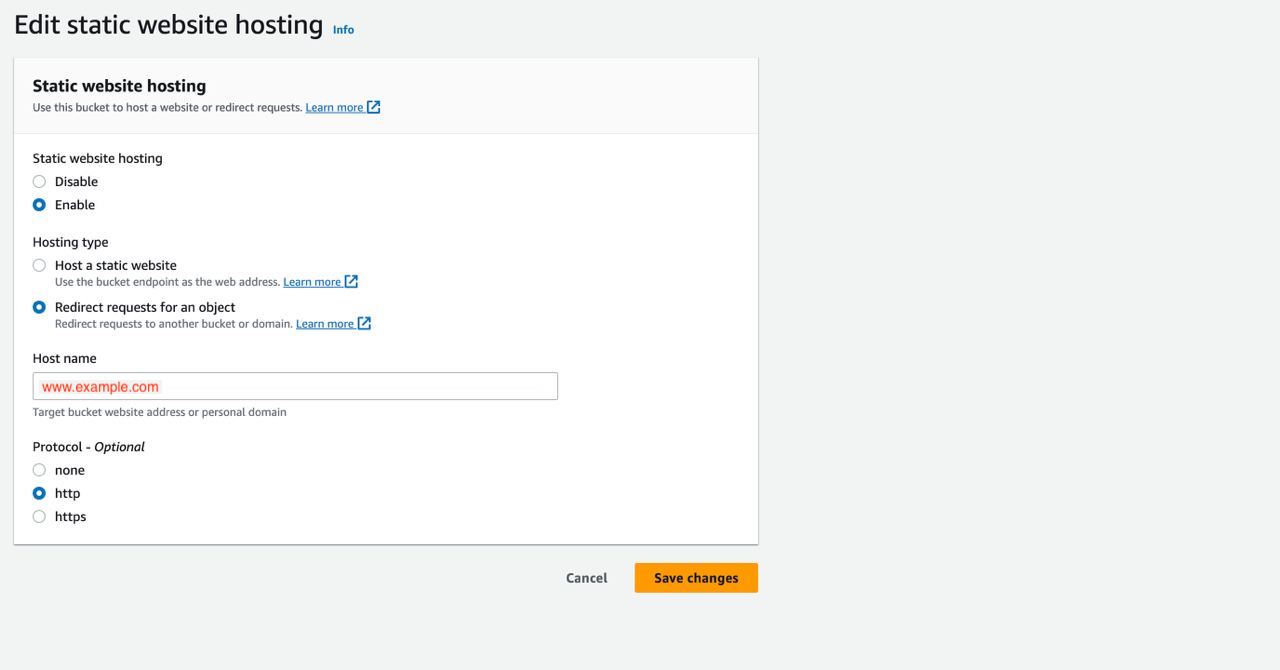
Step 3: under properties section, scroll down to the bottom and enable Static website hosting with below configurations. Choose redirect request option and provide hostname for which requests has to redirect in our case all requests coming to example.com should redirect to http://www.example.com, so provide host name as http://www.example.com.

AWS S3 Static hosting domain redirection

React-native linking error while upgrading @react-native-firebase/app for use_frameworks podfile configuration

While upgrading react-native-firebase from version 5.x to latest version 17.x, there are some breaking changes done, we have to follow firebase documentation to upgrade to latest version.

While upgrading getting linking errors after following firebase configuration steps given in their documentation

Error: react native fbsdk Showing Recent Messages Undefined symbol: OBJC_CLASS$_RCTComponentEvent

Basically this error is coming because of changes done in podfile as given in firebase documentation a specific step mentioned as Altering CocoaPods to use frameworks

in this step it was mentioned that, Beginning with firebase-ios-sdk v9+ (react-native-firebase v15+) you must tell CocoaPods to use frameworks. Open the file ./ios/Podfile and add this line inside your targets:

use_frameworks!

but by doing above changes, it start affecting to many other libraries and started getting errors mentioned above.

Fix for the linking error

remove use_frameworks! from podfile targets section, instead add below lines in your pod file before your target in pod file

pod 'Firebase', :modular_headers => true
pod 'FirebaseCoreInternal', :modular_headers => true
pod 'GoogleUtilities', :modular_headers => true

Basically we are setting modular headers only for firebase not for all solutions is given in this stack over flow post

yarn install does not create node_modules folder

when I upgraded yarn to latest version 3.4.1, I started facing strange issue in my react-native app. when i run yarn install, it does not throw any error but it ends with lots of warnings and does not create node_module folder

yarn recently introduced alternative installation strategy unveiled in September 2018, which is called as PnP which is nothing but ” Plug’n’Play “, because of this i started facing an issue, yarn install was not creating node_modules folder

yarn install node_modules folder not created – Yarn v3.0.2 Why do not install the node_modules folder

solution to this is in your project main directory, create a file “.yarnrc.yml” and add below line in that file

nodeLinker: node-modules

know more about yarn PnP here and the solution i have mentioned here is also described in this documentation page.

react-native version upgrade – Error: index.js: Cannot find module ‘babel-plugin-r’ React Native

after upgrading react-native-reanimated to latest version, I received babel error as follows

Error: index.js: Cannot find module 'babel-plugin-r' React Native

Solution for Error: index.js: Cannot find module ‘babel-plugin-r’ React Native

1. add below line of code in your babel.config.js file

plugins: [
    [
      '@babel/plugin-transform-runtime',
      {
          absoluteRuntime: false,
          corejs: false,
          helpers: true,
          regenerator: true,
          version: '7.0.0-beta.0',
      },
  ],
    'react-native-reanimated/plugin',
  ],

2. install below packages as dev dependencies

"@babel/core": "7.20.12",
"@babel/plugin-transform-runtime": "7.19.6",
"@babel/preset-env": "7.20.2",
"@babel/runtime": "7.20.13",

React-native migrating react-navigation from version 3.x.x to 6.x.x

While i started upgrading react-native from version 0.59.9 to 0.71.2 there were lot of drastic changes done across many libraries. react-navigation is one such which has some serious drastic changes.

Typical error we get while upgrading is

creating a navigator doesn’t take an argument maybe you are trying to use react navigation api 4

solution to this is

Using react-navigations as given in their documentation. the old code looks as follows for Stack Navigator

const Drawer = createStackNavigator({
MainNav: { screen: MainNav }
});

however the usage is changed now, all navigator functions now doesn’t require an argument , the changed code looks as follows

const DrawerStack = createStackNavigator();
function Drawer() {
  return (
    <DrawerStack.Navigator>
      <DrawerStack.Screen name="MainNav" component={MainNav} />
    </DrawerStack.Navigator>
  );
}

createDrawerNavigator code is also changed in version 6.x

old code looks as follows

const AppNavigator = createAppContainer(createDrawerNavigator({
  Drawer: { screen: Drawer }
},
  {
    drawerPosition: 'right',
    contentOptions: {
      activeTintColor: '#e91e63'
    },
    contentComponent: props => <SideBar {...props} />
  }));

changed createDrawerNavigator looks as follows

const DrawerNavigator = createDrawerNavigator();
const AppNavigator = () => {
  return (
    <DrawerNavigator.Navigator
      drawerPosition='right'
      tabBarActiveTintColor='#e91e63'
      drawerContent={props => <SideBar {...props} />}
    >
      <DrawerNavigator.Screen name="Drawer" component={Drawer} />
    </DrawerNavigator.Navigator>
  );
}

similarly all navigator functions like createBottomTabNavigator, NavigationContainer are updated follow latest version documentation

Upgrading react-native from version 0.59.9 to 0.71.2 build errors could not find compatible versions for pod “GTMSessionFetcher/Core”

While upgrading react-native from version 0.59.9 to 0.71.2, I am facing multiple build errors, no surprise that there is drastic changes happened from 0.59.9 to 0.71.2.

Error : CocoaPods could not find compatible versions for pod “GTMSessionFetcher/Core”

[!] CocoaPods could not find compatible versions for pod “GTMSessionFetcher/Core”:
In Podfile:
RNFBAuth (from ../node_modules/@react-native-firebase/auth) was resolved to 17.0.0, which depends on
Firebase/Auth (= 10.4.0) was resolved to 10.4.0, which depends on
FirebaseAuth (~> 10.4.0) was resolved to 10.4.0, which depends on
GTMSessionFetcher/Core (< 4.0, >= 2.1)

RNGoogleSignin (from `../node_modules/react-native-google-signin`) was resolved to 2.1.1, which depends on
  GoogleSignIn (~> 5.0.0) was resolved to 5.0.2, which depends on
    GTMSessionFetcher/Core (~> 1.1)

[!] Do not use “pod install” from inside Rosetta2 (x86_64 emulation on arm64).

[!] – Emulated x86_64 is slower than native arm64

[!] – May result in mixed architectures in rubygems (eg: ffi_c.bundle files may be x86_64 with an arm64 interpreter)

[!] Run “env /usr/bin/arch -arm64 /bin/bash –login” then try again.

Solution (fix) for CocoaPods could not find compatible versions for pod “GTMSessionFetcher/Core”

add below line on top of your pod file, this should be first line of your pod file

$FirebaseSDKVersion = ‘9.6.0’

Reference: thanks to Stackoverflow post

Upgrading react-native from version 0.59.9 to 0.71.2 build errors The Swift pod `FirebaseCoreInternal` depends upon `GoogleUtilities`Upgrading react-native from version 0.59.9 to 0.71.2 build errors

While upgrading react-native from version 0.59.9 to 0.71.2, I am facing multiple build errors, no surprise that there is drastic changes happened from 0.59.9 to 0.71.2.

Error

[!] The following Swift pods cannot yet be integrated as static libraries:

The Swift pod FirebaseCoreInternal depends upon GoogleUtilities, which does not define modules. To opt into those targets generating module maps (which is necessary to import them from Swift when building as static libraries), you may set use_modular_headers! globally in your Podfile, or specify :modular_headers => true for particular dependencies.

Solution (fix) error for FirebaseCoreInternal depends on GoogleUtilities

Add below lines in your pod file

platform :ios, min_ios_version_supported
….

pod ‘Firebase’, :modular_headers => true
pod ‘FirebaseCoreInternal’, :modular_headers => true
pod ‘GoogleUtilities’, :modular_headers => true


Reference- thanks to stackoverflow post

ReactNative – iOS Xcode 14 + MacOS X Ventura – build errors Duplicate Symbols for Architecture arm64

Building ReactNative Apps is always little hard when there is an Operating System Update along with that Xcode updated. Every time when Xcode is updated to a newer version, Apple make some changes which will start affecting iOS app build in ReactNative.

ReactNative iOS App build errors with Xcode 14 and Mac OS X Ventura

Recently when I updated Mac OS X Ventura, It also forced me to update Xcode to latest version 14. After Xcode update, my ReactNative App started failing with lots of errors. I have ReactNative app which is using RN version v0.59.9, Xcode started throwing linking errors like

42 Duplicate symbols for architecture arm64

the complete error looks as follows

duplicate symbol '_OBJC_CLASS_$_FBSDKBase64' in:
    /Users/xyz/Library/Developer/Xcode/DerivedData/MyProject-bmkdjxadfihkgxdpmjllovjakstn/Build/Products/Release-iphoneos/FBSDKCoreKit/libFBSDKCoreKit.a(FBSDKBase64.o)
    /Users/xyz/MyComputer/Development/MyProject/SourceCode/MyBranches/saz_mobile/mobile_rn_dev/sazappmobile/MyProject/ios/Pods/FacebookSDK/FBSDKCoreKit_Basics.framework/FBSDKCoreKit_Basics(FBSDKBase64.o)
duplicate symbol '_OBJC_METACLASS_$_FBSDKBase64' in:
    /Users/xyz/Library/Developer/Xcode/DerivedData/MyProject-bmkdjxadfihkgxdpmjllovjakstn/Build/Products/Release-iphoneos/FBSDKCoreKit/libFBSDKCoreKit.a(FBSDKBase64.o)
    /Users/xyz/MyComputer/Development/MyProject/SourceCode/MyBranches/saz_mobile/mobile_rn_dev/sazappmobile/MyProject/ios/Pods/FacebookSDK/FBSDKCoreKit_Basics.framework/FBSDKCoreKit_Basics(FBSDKBase64.o)
duplicate symbol '_OBJC_CLASS_$_FBSDKBasicUtility' in:
    /Users/xyz/Library/Developer/Xcode/DerivedData/MyProject-bmkdjxadfihkgxdpmjllovjakstn/Build/Products/Release-iphoneos/FBSDKCoreKit/libFBSDKCoreKit.a(FBSDKBasicUtility.o)
    /Users/xyz/MyComputer/Development/MyProject/SourceCode/MyBranches/saz_mobile/mobile_rn_dev/sazappmobile/MyProject/ios/Pods/FacebookSDK/FBSDKCoreKit_Basics.framework/FBSDKCoreKit_Basics(FBSDKBasicUtility.o)
duplicate symbol '_OBJC_METACLASS_$_FBSDKBasicUtility' in:
    /Users/xyz/Library/Developer/Xcode/DerivedData/MyProject-bmkdjxadfihkgxdpmjllovjakstn/Build/Products/Release-iphoneos/FBSDKCoreKit/libFBSDKCoreKit.a(FBSDKBasicUtility.o)
    /Users/xyz/MyComputer/Development/MyProject/SourceCode/MyBranches/saz_mobile/mobile_rn_dev/sazappmobile/MyProject/ios/Pods/FacebookSDK/FBSDKCoreKit_Basics.framework/FBSDKCoreKit_Basics(FBSDKBasicUtility.o)
duplicate symbol '_OBJC_CLASS_$_FBSDKCrashHandler' in:
    /Users/xyz/Library/Developer/Xcode/DerivedData/MyProject-bmkdjxadfihkgxdpmjllovjakstn/Build/Products/Release-iphoneos/FBSDKCoreKit/libFBSDKCoreKit.a(FBSDKCrashHandler.o)
    /Users/xyz/MyComputer/Development/MyProject/SourceCode/MyBranches/saz_mobile/mobile_rn_dev/sazappmobile/MyProject/ios/Pods/FacebookSDK/FBSDKCoreKit_Basics.framework/FBSDKCoreKit_Basics(FBSDKCrashHandler.o)
duplicate symbol '_OBJC_METACLASS_$_FBSDKCrashHandler' in:
    /Users/xyz/Library/Developer/Xcode/DerivedData/MyProject-bmkdjxadfihkgxdpmjllovjakstn/Build/Products/Release-iphoneos/FBSDKCoreKit/libFBSDKCoreKit.a(FBSDKCrashHandler.o)
    /Users/xyz/MyComputer/Development/MyProject/SourceCode/MyBranches/saz_mobile/mobile_rn_dev/sazappmobile/MyProject/ios/Pods/FacebookSDK/FBSDKCoreKit_Basics.framework/FBSDKCoreKit_Basics(FBSDKCrashHandler.o)
duplicate symbol '_OBJC_CLASS_$_FBSDKLibAnalyzer' in:
    /Users/xyz/Library/Developer/Xcode/DerivedData/MyProject-bmkdjxadfihkgxdpmjllovjakstn/Build/Products/Release-iphoneos/FBSDKCoreKit/libFBSDKCoreKit.a(FBSDKLibAnalyzer.o)
    /Users/xyz/MyComputer/Development/MyProject/SourceCode/MyBranches/saz_mobile/mobile_rn_dev/sazappmobile/MyProject/ios/Pods/FacebookSDK/FBSDKCoreKit_Basics.framework/FBSDKCoreKit_Basics(FBSDKLibAnalyzer.o)
duplicate symbol '_OBJC_METACLASS_$_FBSDKLibAnalyzer' in:
    /Users/xyz/Library/Developer/Xcode/DerivedData/MyProject-bmkdjxadfihkgxdpmjllovjakstn/Build/Products/Release-iphoneos/FBSDKCoreKit/libFBSDKCoreKit.a(FBSDKLibAnalyzer.o)
    /Users/xyz/MyComputer/Development/MyProject/SourceCode/MyBranches/saz_mobile/mobile_rn_dev/sazappmobile/MyProject/ios/Pods/FacebookSDK/FBSDKCoreKit_Basics.framework/FBSDKCoreKit_Basics(FBSDKLibAnalyzer.o)
duplicate symbol '_OBJC_CLASS_$_FBSDKTypeUtility' in:
    /Users/xyz/Library/Developer/Xcode/DerivedData/MyProject-bmkdjxadfihkgxdpmjllovjakstn/Build/Products/Release-iphoneos/FBSDKCoreKit/libFBSDKCoreKit.a(FBSDKTypeUtility.o)
    /Users/xyz/MyComputer/Development/MyProject/SourceCode/MyBranches/saz_mobile/mobile_rn_dev/sazappmobile/MyProject/ios/Pods/FacebookSDK/FBSDKCoreKit_Basics.framework/FBSDKCoreKit_Basics(FBSDKTypeUtility.o)
duplicate symbol '_OBJC_METACLASS_$_FBSDKTypeUtility' in:
    /Users/xyz/Library/Developer/Xcode/DerivedData/MyProject-bmkdjxadfihkgxdpmjllovjakstn/Build/Products/Release-iphoneos/FBSDKCoreKit/libFBSDKCoreKit.a(FBSDKTypeUtility.o)
    /Users/xyz/MyComputer/Development/MyProject/SourceCode/MyBranches/saz_mobile/mobile_rn_dev/sazappmobile/MyProject/ios/Pods/FacebookSDK/FBSDKCoreKit_Basics.framework/FBSDKCoreKit_Basics(FBSDKTypeUtility.o)
duplicate symbol '_OBJC_IVAR_$_FBSDKURLSession._session' in:
    /Users/xyz/Library/Developer/Xcode/DerivedData/MyProject-bmkdjxadfihkgxdpmjllovjakstn/Build/Products/Release-iphoneos/FBSDKCoreKit/libFBSDKCoreKit.a(FBSDKURLSession.o)
    /Users/xyz/MyComputer/Development/MyProject/SourceCode/MyBranches/saz_mobile/mobile_rn_dev/sazappmobile/MyProject/ios/Pods/FacebookSDK/FBSDKCoreKit_Basics.framework/FBSDKCoreKit_Basics(FBSDKURLSession.o)
duplicate symbol '_OBJC_CLASS_$_FBSDKURLSession' in:
    /Users/xyz/Library/Developer/Xcode/DerivedData/MyProject-bmkdjxadfihkgxdpmjllovjakstn/Build/Products/Release-iphoneos/FBSDKCoreKit/libFBSDKCoreKit.a(FBSDKURLSession.o)
    /Users/xyz/MyComputer/Development/MyProject/SourceCode/MyBranches/saz_mobile/mobile_rn_dev/sazappmobile/MyProject/ios/Pods/FacebookSDK/FBSDKCoreKit_Basics.framework/FBSDKCoreKit_Basics(FBSDKURLSession.o)
duplicate symbol '_OBJC_METACLASS_$_FBSDKURLSession' in:
    /Users/xyz/Library/Developer/Xcode/DerivedData/MyProject-bmkdjxadfihkgxdpmjllovjakstn/Build/Products/Release-iphoneos/FBSDKCoreKit/libFBSDKCoreKit.a(FBSDKURLSession.o)
    /Users/xyz/MyComputer/Development/MyProject/SourceCode/MyBranches/saz_mobile/mobile_rn_dev/sazappmobile/MyProject/ios/Pods/FacebookSDK/FBSDKCoreKit_Basics.framework/FBSDKCoreKit_Basics(FBSDKURLSession.o)
duplicate symbol '_OBJC_IVAR_$_FBSDKURLSession._delegateQueue' in:
    /Users/xyz/Library/Developer/Xcode/DerivedData/MyProject-bmkdjxadfihkgxdpmjllovjakstn/Build/Products/Release-iphoneos/FBSDKCoreKit/libFBSDKCoreKit.a(FBSDKURLSession.o)
    /Users/xyz/MyComputer/Development/MyProject/SourceCode/MyBranches/saz_mobile/mobile_rn_dev/sazappmobile/MyProject/ios/Pods/FacebookSDK/FBSDKCoreKit_Basics.framework/FBSDKCoreKit_Basics(FBSDKURLSession.o)
duplicate symbol '_OBJC_IVAR_$_FBSDKURLSession._delegate' in:
    /Users/xyz/Library/Developer/Xcode/DerivedData/MyProject-bmkdjxadfihkgxdpmjllovjakstn/Build/Products/Release-iphoneos/FBSDKCoreKit/libFBSDKCoreKit.a(FBSDKURLSession.o)
    /Users/xyz/MyComputer/Development/MyProject/SourceCode/MyBranches/saz_mobile/mobile_rn_dev/sazappmobile/MyProject/ios/Pods/FacebookSDK/FBSDKCoreKit_Basics.framework/FBSDKCoreKit_Basics(FBSDKURLSession.o)
duplicate symbol '_OBJC_IVAR_$_FBSDKURLSessionTask._handler' in:
    /Users/xyz/Library/Developer/Xcode/DerivedData/MyProject-bmkdjxadfihkgxdpmjllovjakstn/Build/Products/Release-iphoneos/FBSDKCoreKit/libFBSDKCoreKit.a(FBSDKURLSessionTask.o)
    /Users/xyz/MyComputer/Development/MyProject/SourceCode/MyBranches/saz_mobile/mobile_rn_dev/sazappmobile/MyProject/ios/Pods/FacebookSDK/FBSDKCoreKit_Basics.framework/FBSDKCoreKit_Basics(FBSDKURLSessionTask.o)
duplicate symbol '_OBJC_IVAR_$_FBSDKURLSessionTask._loggerSerialNumber' in:
    /Users/xyz/Library/Developer/Xcode/DerivedData/MyProject-bmkdjxadfihkgxdpmjllovjakstn/Build/Products/Release-iphoneos/FBSDKCoreKit/libFBSDKCoreKit.a(FBSDKURLSessionTask.o)
    /Users/xyz/MyComputer/Development/MyProject/SourceCode/MyBranches/saz_mobile/mobile_rn_dev/sazappmobile/MyProject/ios/Pods/FacebookSDK/FBSDKCoreKit_Basics.framework/FBSDKCoreKit_Basics(FBSDKURLSessionTask.o)
duplicate symbol '_OBJC_IVAR_$_FBSDKURLSessionTask._task' in:
    /Users/xyz/Library/Developer/Xcode/DerivedData/MyProject-bmkdjxadfihkgxdpmjllovjakstn/Build/Products/Release-iphoneos/FBSDKCoreKit/libFBSDKCoreKit.a(FBSDKURLSessionTask.o)
    /Users/xyz/MyComputer/Development/MyProject/SourceCode/MyBranches/saz_mobile/mobile_rn_dev/sazappmobile/MyProject/ios/Pods/FacebookSDK/FBSDKCoreKit_Basics.framework/FBSDKCoreKit_Basics(FBSDKURLSessionTask.o)
duplicate symbol '_OBJC_CLASS_$_FBSDKURLSessionTask' in:
    /Users/xyz/Library/Developer/Xcode/DerivedData/MyProject-bmkdjxadfihkgxdpmjllovjakstn/Build/Products/Release-iphoneos/FBSDKCoreKit/libFBSDKCoreKit.a(FBSDKURLSessionTask.o)
    /Users/xyz/MyComputer/Development/MyProject/SourceCode/MyBranches/saz_mobile/mobile_rn_dev/sazappmobile/MyProject/ios/Pods/FacebookSDK/FBSDKCoreKit_Basics.framework/FBSDKCoreKit_Basics(FBSDKURLSessionTask.o)
duplicate symbol '_OBJC_METACLASS_$_FBSDKURLSessionTask' in:
    /Users/xyz/Library/Developer/Xcode/DerivedData/MyProject-bmkdjxadfihkgxdpmjllovjakstn/Build/Products/Release-iphoneos/FBSDKCoreKit/libFBSDKCoreKit.a(FBSDKURLSessionTask.o)
    /Users/xyz/MyComputer/Development/MyProject/SourceCode/MyBranches/saz_mobile/mobile_rn_dev/sazappmobile/MyProject/ios/Pods/FacebookSDK/FBSDKCoreKit_Basics.framework/FBSDKCoreKit_Basics(FBSDKURLSessionTask.o)
duplicate symbol '_OBJC_IVAR_$_FBSDKURLSessionTask._requestStartDate' in:
    /Users/xyz/Library/Developer/Xcode/DerivedData/MyProject-bmkdjxadfihkgxdpmjllovjakstn/Build/Products/Release-iphoneos/FBSDKCoreKit/libFBSDKCoreKit.a(FBSDKURLSessionTask.o)
    /Users/xyz/MyComputer/Development/MyProject/SourceCode/MyBranches/saz_mobile/mobile_rn_dev/sazappmobile/MyProject/ios/Pods/FacebookSDK/FBSDKCoreKit_Basics.framework/FBSDKCoreKit_Basics(FBSDKURLSessionTask.o)
duplicate symbol '_OBJC_IVAR_$_FBSDKURLSessionTask._requestStartTime' in:
    /Users/xyz/Library/Developer/Xcode/DerivedData/MyProject-bmkdjxadfihkgxdpmjllovjakstn/Build/Products/Release-iphoneos/FBSDKCoreKit/libFBSDKCoreKit.a(FBSDKURLSessionTask.o)
    /Users/xyz/MyComputer/Development/MyProject/SourceCode/MyBranches/saz_mobile/mobile_rn_dev/sazappmobile/MyProject/ios/Pods/FacebookSDK/FBSDKCoreKit_Basics.framework/FBSDKCoreKit_Basics(FBSDKURLSessionTask.o)
duplicate symbol '_FBSDKAppEventCity' in:
    /Users/xyz/Library/Developer/Xcode/DerivedData/MyProject-bmkdjxadfihkgxdpmjllovjakstn/Build/Products/Release-iphoneos/FBSDKCoreKit/libFBSDKCoreKit.a(FBSDKAppEvents.o)
    /Users/xyz/MyComputer/Development/MyProject/SourceCode/MyBranches/saz_mobile/mobile_rn_dev/sazappmobile/MyProject/ios/Pods/FacebookSDK/FBSDKCoreKit_Basics.framework/FBSDKCoreKit_Basics(FBSDKUserDataStore.o)
duplicate symbol '_FBSDKAppEventCountry' in:
    /Users/xyz/Library/Developer/Xcode/DerivedData/MyProject-bmkdjxadfihkgxdpmjllovjakstn/Build/Products/Release-iphoneos/FBSDKCoreKit/libFBSDKCoreKit.a(FBSDKAppEvents.o)
    /Users/xyz/MyComputer/Development/MyProject/SourceCode/MyBranches/saz_mobile/mobile_rn_dev/sazappmobile/MyProject/ios/Pods/FacebookSDK/FBSDKCoreKit_Basics.framework/FBSDKCoreKit_Basics(FBSDKUserDataStore.o)
duplicate symbol '_FBSDKAppEventGender' in:
    /Users/xyz/Library/Developer/Xcode/DerivedData/MyProject-bmkdjxadfihkgxdpmjllovjakstn/Build/Products/Release-iphoneos/FBSDKCoreKit/libFBSDKCoreKit.a(FBSDKAppEvents.o)
    /Users/xyz/MyComputer/Development/MyProject/SourceCode/MyBranches/saz_mobile/mobile_rn_dev/sazappmobile/MyProject/ios/Pods/FacebookSDK/FBSDKCoreKit_Basics.framework/FBSDKCoreKit_Basics(FBSDKUserDataStore.o)
duplicate symbol '_FBSDKAppEventZip' in:
    /Users/xyz/Library/Developer/Xcode/DerivedData/MyProject-bmkdjxadfihkgxdpmjllovjakstn/Build/Products/Release-iphoneos/FBSDKCoreKit/libFBSDKCoreKit.a(FBSDKAppEvents.o)
    /Users/xyz/MyComputer/Development/MyProject/SourceCode/MyBranches/saz_mobile/mobile_rn_dev/sazappmobile/MyProject/ios/Pods/FacebookSDK/FBSDKCoreKit_Basics.framework/FBSDKCoreKit_Basics(FBSDKUserDataStore.o)
duplicate symbol '_FBSDKAppEventEmail' in:
    /Users/xyz/Library/Developer/Xcode/DerivedData/MyProject-bmkdjxadfihkgxdpmjllovjakstn/Build/Products/Release-iphoneos/FBSDKCoreKit/libFBSDKCoreKit.a(FBSDKAppEvents.o)
    /Users/xyz/MyComputer/Development/MyProject/SourceCode/MyBranches/saz_mobile/mobile_rn_dev/sazappmobile/MyProject/ios/Pods/FacebookSDK/FBSDKCoreKit_Basics.framework/FBSDKCoreKit_Basics(FBSDKUserDataStore.o)
duplicate symbol '_FBSDKAppEventDateOfBirth' in:
    /Users/xyz/Library/Developer/Xcode/DerivedData/MyProject-bmkdjxadfihkgxdpmjllovjakstn/Build/Products/Release-iphoneos/FBSDKCoreKit/libFBSDKCoreKit.a(FBSDKAppEvents.o)
    /Users/xyz/MyComputer/Development/MyProject/SourceCode/MyBranches/saz_mobile/mobile_rn_dev/sazappmobile/MyProject/ios/Pods/FacebookSDK/FBSDKCoreKit_Basics.framework/FBSDKCoreKit_Basics(FBSDKUserDataStore.o)
duplicate symbol '_FBSDKAppEventState' in:
    /Users/xyz/Library/Developer/Xcode/DerivedData/MyProject-bmkdjxadfihkgxdpmjllovjakstn/Build/Products/Release-iphoneos/FBSDKCoreKit/libFBSDKCoreKit.a(FBSDKAppEvents.o)
    /Users/xyz/MyComputer/Development/MyProject/SourceCode/MyBranches/saz_mobile/mobile_rn_dev/sazappmobile/MyProject/ios/Pods/FacebookSDK/FBSDKCoreKit_Basics.framework/FBSDKCoreKit_Basics(FBSDKUserDataStore.o)
duplicate symbol '_OBJC_CLASS_$_FBSDKUserDataStore' in:
    /Users/xyz/Library/Developer/Xcode/DerivedData/MyProject-bmkdjxadfihkgxdpmjllovjakstn/Build/Products/Release-iphoneos/FBSDKCoreKit/libFBSDKCoreKit.a(FBSDKUserDataStore.o)
    /Users/xyz/MyComputer/Development/MyProject/SourceCode/MyBranches/saz_mobile/mobile_rn_dev/sazappmobile/MyProject/ios/Pods/FacebookSDK/FBSDKCoreKit_Basics.framework/FBSDKCoreKit_Basics(FBSDKUserDataStore.o)
duplicate symbol '_OBJC_METACLASS_$_FBSDKUserDataStore' in:
    /Users/xyz/Library/Developer/Xcode/DerivedData/MyProject-bmkdjxadfihkgxdpmjllovjakstn/Build/Products/Release-iphoneos/FBSDKCoreKit/libFBSDKCoreKit.a(FBSDKUserDataStore.o)
    /Users/xyz/MyComputer/Development/MyProject/SourceCode/MyBranches/saz_mobile/mobile_rn_dev/sazappmobile/MyProject/ios/Pods/FacebookSDK/FBSDKCoreKit_Basics.framework/FBSDKCoreKit_Basics(FBSDKUserDataStore.o)
duplicate symbol '_FBSDKAppEventPhone' in:
    /Users/xyz/Library/Developer/Xcode/DerivedData/MyProject-bmkdjxadfihkgxdpmjllovjakstn/Build/Products/Release-iphoneos/FBSDKCoreKit/libFBSDKCoreKit.a(FBSDKAppEvents.o)
    /Users/xyz/MyComputer/Development/MyProject/SourceCode/MyBranches/saz_mobile/mobile_rn_dev/sazappmobile/MyProject/ios/Pods/FacebookSDK/FBSDKCoreKit_Basics.framework/FBSDKCoreKit_Basics(FBSDKUserDataStore.o)
duplicate symbol '_FBSDKAppEventFirstName' in:
    /Users/xyz/Library/Developer/Xcode/DerivedData/MyProject-bmkdjxadfihkgxdpmjllovjakstn/Build/Products/Release-iphoneos/FBSDKCoreKit/libFBSDKCoreKit.a(FBSDKAppEvents.o)
    /Users/xyz/MyComputer/Development/MyProject/SourceCode/MyBranches/saz_mobile/mobile_rn_dev/sazappmobile/MyProject/ios/Pods/FacebookSDK/FBSDKCoreKit_Basics.framework/FBSDKCoreKit_Basics(FBSDKUserDataStore.o)
duplicate symbol '_FBSDKAppEventLastName' in:
    /Users/xyz/Library/Developer/Xcode/DerivedData/MyProject-bmkdjxadfihkgxdpmjllovjakstn/Build/Products/Release-iphoneos/FBSDKCoreKit/libFBSDKCoreKit.a(FBSDKAppEvents.o)
    /Users/xyz/MyComputer/Development/MyProject/SourceCode/MyBranches/saz_mobile/mobile_rn_dev/sazappmobile/MyProject/ios/Pods/FacebookSDK/FBSDKCoreKit_Basics.framework/FBSDKCoreKit_Basics(FBSDKUserDataStore.o)
ld: 42 duplicate symbols for architecture arm64
clang: error: linker command failed with exit code 1 (use -v to see invocation)

When I started looking for solution, I found multiple solutions, which actually worked for many people, however for me none of those solutions worked.

Solution for Duplicate Symbols for architecture arm64 – which worked for me

Steps to resolve

  1. Open your project in Xcode
  2. Click on Pods project from your project navigator as shown in below diagram
    then select Build Phases and select the project target in which you are getting errors. For me all linking errors were for FBSDKCore, you can find that by seeing the error.

  3. Then from error get the file name for which you are getting duplicate symbol. for example if error has
    duplicate symbol ‘_FBSDKAppEventLastName’ in: /libFBSDKCoreKit.a(FBSDKAppEvents.o)
    Then find file FBSDKAppEvents.m from the search box given in above screenshot.
  4. Find the file and select the file and delete by clicking on delete(-) icon in the Xcode. ( refer below screenshot)
  5. Since in my case there are 42 linking errors, all the errors are coming from more than 4 to 5 different files. I deleted all the files one by one.
  6. This resolved all 42 linking error.

Basically the error appears when same implementation is referenced more than one in the project. Which mean in my case some of the .m files from FBSDKCoreKit are added more than once, it is difficult to find how those files added twice, but usually it happens when libraries are linked through pods as well as manually ( typically in old projects libraries might have also linked using ReactNative link command)

Now question is why Xcode 14 started giving errors? which was not the case earlier with lower version of Xcodes ? this is basically because the latest Xcode checks strictly many things and it starts complaining.

Is it the only solution which fix this issue ? well that I am not sure, there are many more solutions giving in StackOverflow as well as GitHub, some fixes might work for you. Here are those references for you, in case my fix doesn’t work for you 🙂

References:

1. Github Post- duplicate symbols for architecture x86_64 React Ntaive version 0.64 #32016

2. Github Post – duplicate symbols for architecture x86_64 React Ntaive

3. Stack over flow post – Duplicate Symbols for Architecture arm64